
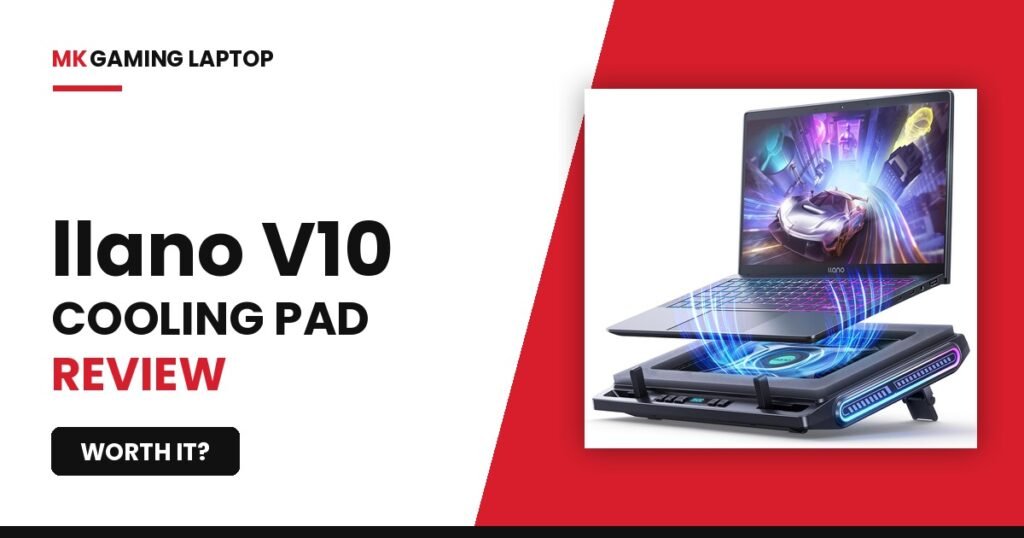
llano V10 Gaming Laptop Cooling Pad Review: Worth It?

My laptop hit 94°C last summer, mid game, screen flickering, fans screaming like a jet about to take off. That is the exact moment I went looking for a fix, and it is why I ended up buying the llano V10 gaming laptop cooling pad instead of just accepting that my $1,400 machine was cooking itself alive.
Here is the thing most reviews will not tell you. A cooling pad is not magic. It will not fix a laptop with dried out thermal paste, and it will not turn a budget machine into a beast. But if your laptop is throttling because airflow underneath is trapped against a desk, this thing genuinely changes what your temps look like.
This llano V10 gaming laptop cooling pad review comes from three weeks of running it on a laptop that was already struggling under load, no AC, real gaming sessions, not some controlled lab test. The results surprised me, and so did a couple of things I got wrong the first time I set it up.
Keep reading, because the mistake I made during setup cost me an hour of troubleshooting I did not need to do.
Quick Take
Why My Laptop Was Overheating In The First Place
Before I even opened the box, I wanted to know why my laptop was struggling. If you skip this step you can end up blaming a cooling pad for something it was never going to fix.
The Symptoms
Frame drops during long sessions. A fan that never went quiet, not even on the desktop. And once, the screen actually flickered for a second during a race in a driving game, which is usually a sign the GPU is throttling hard to protect itself.
I checked temps with a monitoring app running in the background. CPU was sitting around 88°C under load. GPU was worse, brushing past 90°C during anything demanding. Those numbers are not dangerous enough to damage the hardware immediately, but they are high enough that the laptop starts slowing itself down to survive, which according to Intel’s own explanation of the mechanism is exactly what throttling means.
What I Ruled Out First
I cleaned the intake vents with compressed air. I checked that I was not gaming with the laptop sitting on a blanket or my lap, which blocks intake completely. I even reapplied the stock thermal paste on the CPU, just to rule that out as the main issue.
None of that solved it on its own. The intake vents on this particular laptop sit flush against the bottom panel, so even on a hard desk, the fans were pulling in air that had nowhere good to go. That is the specific problem a cooling pad is built to solve, so I felt reasonably confident going in that this was not going to be wasted money. If you are still shopping and want to avoid this altogether, our guide to choosing a gaming laptop covers how to spot bad thermal design before you buy.
What’s Actually In The Box
Nothing fancy here, which honestly I appreciated, and that simplicity is part of what makes this llano V10 gaming laptop cooling pad review straightforward to write. The pad itself, a USB cable for power, a small bag of extra foam inserts, and a basic instruction sheet that gets the point across without making you hunt for a QR code.
Build Quality First Impressions
Picked it up and it felt heavier than I expected for something in this price range. Not heavy in a bad way, more like they did not cheap out on the frame material. The mesh surface where the laptop actually sits has a slight texture to it, which helps grip so the laptop does not slide around once you tilt the stand up.
The RGB strip along the front edge is bright even in a lit room, and the control buttons have a real click to them, not the mushy feel you get on cheaper pads. The USB pass through ports came in handy too, I ran my Razer DeathAdder V4 Pro off the USB A port without giving up a port on the laptop itself.
Setting It Up (And The Mistake I Made)
Setup took about five minutes, but I will be honest about where I went wrong so you do not repeat it.
Foam Inserts For Smaller Laptops
My laptop is a 15.6 inch model, so I did not think I needed the foam inserts at all. Turns out even at that size, without the inserts the laptop had a small gap on one side and rocked slightly when I typed. I added the smaller foam piece on the left edge and the wobble disappeared completely.
If you have got a 13 or 14 inch laptop, do not skip these. They are not just for looks, they are doing real work keeping the laptop centered over the fan.
I plugged the USB cable into a laptop port that was also being used by a wireless mouse dongle, and the fan kept cutting out randomly during my first session. I assumed the pad was defective. Spent close to an hour troubleshooting before I moved the cable to a different USB port on the laptop and the problem vanished. Some ports just do not deliver consistent power alongside other devices. Plug it into its own port if you can.
llano V10 Gaming Laptop Cooling Pad Review: The Deep Dive
This is the part that actually matters, so let us get into what the thing does once it is running.
The Turbo Fan And 3500 RPM Motor
The 4.72 inch fan in the center is noticeably larger than what you get on cheaper pads, and you can feel the difference in airflow just holding your hand over it. At the top speed setting it moves a real amount of air, not the token breeze some of these pads put out.
At max RPM it is not silent. I would put the noise somewhere between a low hum and what a basic desk fan sounds like on its second setting. It is not distracting under headphones, but if you game without audio you will notice it.
RGB Lighting And Memory Recall
Twelve lighting modes is more than I needed honestly, but the breathing mode in blue became my default. What I liked more than the modes themselves is the memory function. Turn the pad off, come back the next day, and it remembers exactly what you had set instead of resetting to some default rainbow cycle. Small thing, but it is the kind of detail that tells you someone thought about actual daily use instead of just checking a feature box.
Physical Buttons Versus Touch Controls
I have used touch sensitive cooling pads before and hated them. Mid game, brushing the surface by accident and suddenly your RGB mode changed or your fan speed dropped. The llano V10 uses real physical buttons, and I never once triggered something by accident during three weeks of use. If you have been burned by touch controls before, this alone might be worth the switch.
The Stand And Anti Slip Baffles
Three height positions on the stand. The lowest is barely an incline, the highest gives a noticeable typing angle that a lot of people find more comfortable for long sessions. The front baffles that stop your laptop from sliding forward actually work, even when I intentionally pushed against the laptop to test it.
Dust Filter
The removable filter at the bottom does what it says. After about two weeks of daily use in a normal apartment, not a particularly dusty one, I pulled the filter and there was a visible layer of dust and pet hair caught in it. Better that than it building up inside my laptop’s actual heatsink.
The Real Numbers, Before And After Temps
This is the part of the llano V10 gaming laptop cooling pad review where I stopped guessing and just tracked it properly using a monitoring app during identical thirty minute gaming sessions.
Before the pad, CPU load temps averaged 87 to 89°C, with GPU peaking around 91°C during the most demanding scenes.
After adding the llano V10 on the highest fan setting, CPU load temps dropped to an average of 71 to 74°C. GPU peaked around 78°C in the same scenes, comfortably under the danger zone NVIDIA itself outlines for GPU overheating.
| Metric | Before llano V10 | After llano V10 |
|---|---|---|
| CPU load temp | 87 to 89°C | 71 to 74°C |
| GPU peak temp | 91°C | 78°C |
| Throttling observed | Yes, frequent | No, not once in 3 weeks |
That is roughly a 15 to 17°C drop in my testing, not the full 38°C claimed on the box. I want to be straight with you here. The 38°C figure is almost certainly measured against a worst case scenario, like a laptop sitting directly on a soft surface with vents fully blocked, compared to open airflow on the pad. My laptop was already on a hard desk before I started, so I was not starting from the worst possible baseline, which is exactly why my improvement number looks smaller than the marketing claim.
If your laptop currently sits on a bed, couch, or carpet, you are a much better candidate to see numbers closer to that 38°C figure, because you are starting from a genuinely bad airflow situation. This lines up with what we measured in our gaming laptop vs desktop breakdown, where a quality cooling pad accounted for a similar single digit to mid teens temperature swing depending on the starting setup.
Pros And Cons Based On Real Use And Other Buyer Feedback
For this llano V10 gaming laptop cooling pad review, I spent time reading through other verified buyer feedback alongside my own experience, and a pattern showed up pretty clearly.
What People Praise
- Physical buttons instead of touch controls
- USB pass through ports for a mouse or keyboard
- Removable dust filter, rare at this price
- RGB memory recall between sessions
- Solid, heavier build than expected
What People Complain About
- RGB strip is bright in a dark room
- Noticeable fan noise at max RPM
- Some expected the full 38°C drop
- Draws battery if powered from laptop USB
Common Mistakes People Make With Cooling Pads (A Key Part Of Any llano V10 Gaming Laptop Cooling Pad Review)
Assuming It Fixes Internal Thermal Issues
A cooling pad manages external airflow. It cannot fix dried out or poorly applied thermal paste inside the laptop, and it cannot fix a heatsink clogged with years of internal dust. If your laptop is old and has never been opened up for cleaning, a repaste or professional cleaning might matter more than any cooling pad.
Wrong Laptop Placement
Centering your laptop over the main fan matters more than people think. Push it too far forward or to one side and you lose a meaningful chunk of the airflow benefit. Use the foam inserts and baffles to actually center it, do not just eyeball it.
Ignoring The Dust Filter
It is removable for a reason. Buy one of these and never clean the filter, and eventually you are just recirculating dusty air instead of clean air. Takes thirty seconds to pop it out and tap it clean.
Quick Glance Comparison
Here is how the numbers in this llano V10 gaming laptop cooling pad review stack up against similar options on the market.
| Feature | llano V10 | llano V12 | Generic Budget Pad |
|---|---|---|---|
| Best laptop size | 13 to 17.3 in | Larger laptops | Varies, often limited |
| Fan size | 4.72 in turbo fan | Larger dual fan setup | Small single fan |
| Controls | Physical buttons | Physical buttons | Often touch panel |
| RGB memory recall | Yes | Yes | Rarely |
| Dust filter | Yes, removable | Yes, removable | Usually none |
| USB pass through | 1x USB C, 1x USB A | Typically more ports | Sometimes 1 port |
Who This Cooling Pad Is Actually For
Good Fit
If you take one thing from this llano V10 gaming laptop cooling pad review, it’s this: you are gaming on a 13 to 17.3 inch laptop that runs hot under load, you have already confirmed your vents are not physically blocked or clogged with dust, and you want fan control that does not accidentally change settings mid match. You also want the extra USB ports for a mouse or keyboard without giving up a laptop port. This is a natural pairing for RTX 5060 class machines like the Acer Nitro V 16S, which run warm enough under load to benefit from the extra airflow.
Not A Good Fit
Skip this if your laptop’s overheating problem is actually internal, like old thermal paste or a heatsink packed with years of dust. No external pad fixes that. Also skip it if you specifically need silent operation for late night sessions with no headphones, since max fan speed is noticeable. If none of that describes your situation, browse our Best Gaming Laptop Cooling Pads 2026 roundup to see how the V10 stacks up against the rest of the field.
Advanced Tips Most llano V10 Gaming Laptop Cooling Pad Review Articles Miss
Pair The Fan Curve With Your Laptop’s Own Software
Most gaming laptops let you set a custom fan curve in the manufacturer’s software. Set your laptop’s own internal fans to ramp up a bit earlier, and let the llano V10 handle the bulk of the external airflow on medium to high. This combo kept my temps more stable than relying on either one alone at max settings constantly.
Watch Battery Drain If You’re On The Go
Running the pad off a laptop USB port instead of a wall adapter will pull from your battery. Fine at a desk, but if you are using this on battery power away from an outlet, the RGB lighting especially will chip away at your battery life faster than you would expect. Turn RGB off entirely if you are trying to stretch a session unplugged.
Final Verdict: My llano V10 Gaming Laptop Cooling Pad Review Wrap Up

If your gaming laptop is throttling because of trapped heat and blocked airflow, not internal thermal paste issues, the llano V10 will genuinely lower your temps and likely stop the throttling that is costing you frame rate. The physical buttons alone make it worth considering over touch panel competitors, and the dust filter is a detail most pads in this range simply do not include.
Do not expect the full 38°C drop unless you are starting from a genuinely bad airflow situation like a soft surface or blocked vents. Expect somewhere in the 15 to 20°C range if you are already on a hard desk like I was, which is still enough to pull most throttling laptops back into safe, stable performance.
llano V10 Gaming Laptop Cooling Pad Review FAQ
Does the llano V10 work with a 17 inch laptop?
Yes, it is built for the 13 to 17.3 inch range, though if your laptop is on the larger end of that or bigger, the llano V12 is worth comparing since it is built with bigger laptops in mind.
Does it support liquid metal cooled laptops?
Yes, the flat contact surface underneath is designed to work safely with laptops that use liquid metal thermal compound, which some cooling pads with uneven surfaces are not great for. Liquid metal setups run cooler by design, as ASUS ROG has documented in its own laptops, but they still benefit from extra external airflow during long sessions.
How loud is it at max RPM?
Noticeable but not overwhelming. Think somewhere between a quiet hum and a basic desk fan on a low to medium setting. Fine under headphones, more noticeable if you are gaming with no audio.
Does it drain laptop battery through the USB ports?
If you are powering it from your laptop instead of a wall outlet, yes, it will pull from your battery, especially with RGB running. Plug into a wall adapter when possible if you are not near an outlet already.
Is it worth it over just using a basic laptop stand?
A basic stand raises your laptop but does not actively pull heat away with a dedicated fan. If your laptop is genuinely throttling under load, the active airflow from the llano V10 makes a measurable difference that a passive stand simply cannot match, which is really the core takeaway of this llano V10 gaming laptop cooling pad review.