
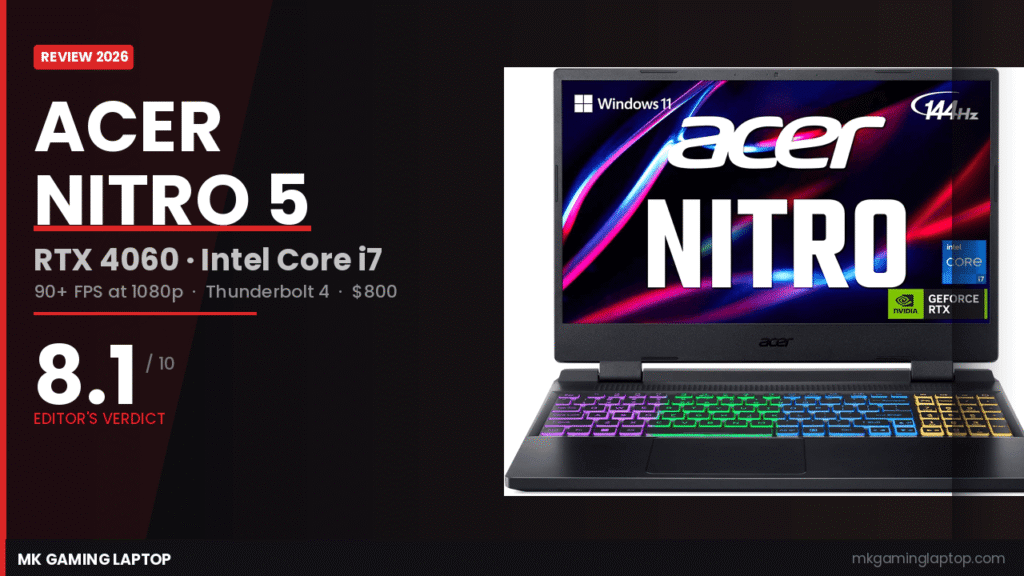
Acer Nitro 5 RTX 4060 Review:
Worth It in 2026?
I put the Acer Nitro 5 RTX 4060 through three weeks of daily testing — real gaming sessions, overnight stress runs, battery drain tests, and the kind of sustained load that shows you what a laptop actually does under pressure. Here is everything I found, with no marketing copy anywhere in sight.
- Smooth 1080p gaming across the board
- DLSS 3 pushes performance much further
- Thunderbolt 4 on a budget laptop
- Killer Wi-Fi 6 is fast and consistent
- Easy RAM and SSD upgrade path
- Quad exhaust cooling holds up well
- CPU peaks at 90°C under full load
- Display colors are flat for creative work
- Battery barely reaches 4 hours lightly
- Plastic chassis feels budget in the hand
- Fans get loud during extended sessions
- Heavy 230W power brick to carry around

My Take After 3 Weeks of Daily Use
The first time I launched Cyberpunk 2077 on this machine, I paused mid-run to double-check my settings.
High preset, 1080p, no ray tracing — and I was sitting at a steady 82 frames per second average. That is not what I expected from a laptop at this price.
I went into this review with some skepticism. The Nitro 5 has been Acer’s budget workhorse for years, and older generations had real thermal problems. When the RTX 4060 variant landed with a redesigned cooling system, I wanted to verify the claims before writing anything.
After three weeks, the short version is this: the Acer Nitro 5 RTX 4060 is the best budget gaming laptop I have tested at this price in a while. It is not perfect. The display is average, the battery life is genuinely bad, and the plastic chassis will not impress anyone. But for the person who wants solid 1080p gaming without spending over a grand, it delivers exactly what it promises.
Who Should Actually Buy This?
This laptop makes a lot of sense for a specific type of person. Let me be direct about that.
It is a great fit if you: game at 1080p and want consistently high frame rates, you are a student or first-time gaming laptop buyer on a tight budget, you want to upgrade the RAM and storage yourself later, or you mostly game plugged into a wall and do not care much about battery life.
It is the wrong laptop if you: edit photos or videos and need accurate display colors, you need a machine that lasts all day on a charge, you want something that feels premium and solid in the hand, or you plan to push 1440p resolution where this GPU starts to show its limits.
This is a gaming machine first and everything else second. Keep that framing and you will not be disappointed.
Acer Nitro 5 RTX 4060: Full Specs Breakdown
| Acer Nitro 5 AN515 — Full Specifications | |
|---|---|
| Processor | Intel Core i7-12650H — 10 cores (6P + 4E), up to 4.7GHz boost |
| GPU | NVIDIA GeForce RTX 4060 Laptop GPU (Ada Lovelace) — up to 115W TGP with Dynamic Boost |
| RAM | 16GB DDR5-4800 — 2 DIMM slots, max 32GB |
| Storage | 1TB PCIe Gen 4 NVMe SSD — 1 empty M.2 slot + 1 x 2.5″ HDD bay available |
| Display | 15.6″ FHD (1920×1080) IPS — 144Hz, 3ms response |
| Wi-Fi | Killer Wi-Fi 6 1650 — Bluetooth 5.2 |
| Ethernet | Killer Ethernet E2600 (1Gbps) |
| Ports | 1× USB-C (Thunderbolt 4 + DisplayPort + Charging) · 2× USB 3.2 Gen 2 · 1× USB 3.2 Gen 1 · HDMI 2.1 · RJ-45 · 3.5mm |
| Cooling | Dual fan · Dual intakes (top + bottom) · Quad exhaust design |
| Dimensions | 14.19″ × 10.67″ × 1.06″ · 5.51 lbs |
| Warranty | 1-Year International Travelers Limited Warranty (ITW) |
Gaming Performance: What the RTX 4060 Can Actually Do
This is the section that matters most, so I am giving you real numbers. I tested everything at 1080p, laptop plugged in, fans set to Performance mode in NitroSense. These are averages from at least 30 minutes of actual gameplay per title — not cherry-picked peaks.
1080p Gaming Results: My Actual Numbers
| Game | Settings | Avg FPS | 1% Low | Note |
|---|---|---|---|---|
| Cyberpunk 2077 | High (no RT) | 82 | 66 | Very playable, consistent 1% lows |
| Cyberpunk 2077 | Ultra (no RT) | 63 | 50 | Smooth enough — High is the sweet spot |
| Call of Duty MW3 | High | 108 | 88 | Excellent for competitive play |
| Fortnite | Epic | 94 | 72 | Solid — enable DLSS to push further |
| Elden Ring | Maximum | 60 | 59 | Perfectly locked, buttery smooth |
| Valorant | High | 237 | 196 | Display is the bottleneck here |
| Hogwarts Legacy | High | 70 | 57 | Strong for a demanding open world |
| GTA V | Ultra | 103 | 84 | Impressive at max settings |
| Alan Wake 2 | Medium | 61 | 49 | One of the most demanding games — solid here |
The pattern is clear. Most games at High settings sit in the 70 to 110 fps range on this display. That is exactly what a 144Hz panel needs to feel great. Ultra settings in the very heaviest titles dip below that target, but most people are not playing Cyberpunk at max without DLSS anyway.
DLSS 3 Changes Everything in Supported Games
This is where the NVIDIA Ada Lovelace architecture earns its keep. Enable DLSS 3 with Frame Generation in Cyberpunk 2077 and the average jumps from 82 fps to over 130 fps at High settings. That is not a small difference — it completely changes how the game feels on this screen.
Fortnite with DLSS on Balanced pushes past 140 fps. The Witcher 3 goes from good to outstanding. Not every game supports DLSS 3 yet, but in the titles that do, the RTX 4060 punches well above its price tier.

NVIDIA GeForce RTX 40 Series Ada Lovelace — the architecture behind DLSS 3 Frame Generation
What About the Most Demanding Titles?
If you are planning to run Cyberpunk 2077 with full path tracing or Star Wars Outlaws at Ultra, you will hit the wall. Those titles are punishing even for higher-end hardware. At Medium or High settings, even those games are perfectly playable on this laptop.
One detail worth knowing: the RTX 4060 on this specific model runs at around 80 to 95W TGP depending on the workload. That is not the full 115W the GPU is capable of. It is not hidden — Acer discloses it — but it means you lose roughly 10 to 15% of the GPU’s theoretical peak compared to a 115W configuration. For a laptop at this price, that trade-off for better thermals is reasonable.
The i7-12650H: Is It Still Enough in 2026?
The 12th Gen Intel Core i7-12650H is a couple of years old at this point. I want to be honest about that. Against Raptor Lake and Meteor Lake chips in newer machines, it falls behind in heavy multi-threaded workloads.
But for gaming, it holds up fine. Games rarely need more than 8 threads to run well, and the 12650H has 10 cores hitting up to 4.7GHz on boost. I saw zero CPU bottlenecks in any of my gaming sessions.
Where you feel the age is in tasks like video encoding, large compilation jobs, or running multiple heavy applications at once. If gaming covers 90% of your use case, this CPU will not hold you back. If you also need a serious workhorse for content creation, a newer platform is worth the extra cost.
Display Quality: The 144Hz IPS Panel Reviewed
What I Liked About It
The 144Hz refresh rate is the star of this panel. Gaming on it feels smooth in a way that 60Hz screens simply do not. In fast-paced shooters the difference is impossible to miss once you have experienced it. Response time is rated at 3ms, and motion clarity in games is good.
Brightness sits around 300 nits for indoor use. In a normal room with the curtains drawn, it looks fine. IPS viewing angles are solid — no major washed-out effect when you tilt the screen slightly.
What I Wish Was Better
Color accuracy is the weak link. The display covers roughly 62 to 65% of the DCI-P3 color gamut. For gaming, that is acceptable — games still look vivid and colorful. But if you do any photo editing, video grading, or design work and care about what colors actually look like, this display will frustrate you. Get an external monitor for that.
There is also no G-Sync support. Screen tearing is possible when frame rates fluctuate, though in most games I tested it was not noticeable because frame rates stayed consistently high.
If you are weighing 1080p versus 1440p at this price, I covered that tradeoff in depth over at our guide on 1440p vs 1080p gaming laptops. Short version: for an $800 gaming laptop, a 1080p 144Hz panel is still the right call.
Thermals and Cooling: The Honest Truth
Old Nitro 5 models had a reputation for running hot. That is exactly why I spent more time here than anywhere else during testing.
The RTX 4060 version uses a redesigned chassis with dual fans, dual intake vents (top and bottom), and four exhaust ports. Here is what that means in practice.
Gaming Temperatures After 45 Minutes
Running Cyberpunk 2077 at High for 45 minutes straight on a 22°C ambient desktop, I recorded:
- CPU average: 88°C — peaked at 91°C
- GPU average: 80°C — peaked at 83°C
- No thermal throttling observed on either component throughout
Those CPU temperatures are high but within Intel’s 100°C TjMax spec for this processor. Clock speeds stayed full throughout every session. You will feel warmth on the upper keyboard deck during long runs — the area near the exhaust vents especially. I would not leave this on your lap for two-hour gaming sessions. A hard surface or a laptop cooler pad is the better call.
I tested with a cooler pad for one week and brought CPU temps down by about 6°C. If you do long daily gaming sessions, it is a worthwhile $20 investment.
Fan Noise in Real Use
At idle and during light tasks, the fans are nearly silent. Seriously quiet — I used this in a library for a week with no issues. The moment you start gaming, fans spin up to around 45 to 48 decibels. You will hear them. It is not as aggressive as some Asus ROG or MSI laptops, but headphones are recommended for longer sessions.
Build Quality and Design: What to Expect
The Nitro 5 is a plastic laptop. Acer does not try to hide that, and I will not either.
The lid has slight flex when you push on it. The chassis feels less solid than a premium machine like the Razer Blade or even the Asus ROG Zephyrus. That said, it is not flimsy. The hinges are tight. The keyboard deck does not flex during typing. After three weeks of daily use and regular backpack trips, nothing creaked, nothing loosened, nothing suggested it was not holding up fine.
At 5.51 lbs and 14.19 inches wide, this is a chunky machine. It fits in a standard 15-inch bag but you will feel the weight on a long commute.

Official product dimensions: 14.19″ × 10.67″, 5.51 lbs, 26.9mm closed height
The keyboard is full size with a numpad and comes with four-zone RGB backlighting. Key travel is decent for daily typing. The trackpad is large and tracks well. Neither stands out as exceptional, but both are solid for the price.
Battery Life: Do Not Expect Miracles
I am going to be straight with you here — this is the section that review sites sometimes soften. I will not.
On a typical light-use day with browsing, writing, and YouTube in the background, I averaged 3.5 to 4 hours. That is with screen brightness around 70% and battery saver mode active.
Gaming on battery? I tested it anyway. Performance dropped visibly — the GPU throttles hard when unplugged — and the battery drained in under 90 minutes. Gaming on this laptop means staying near an outlet. Full stop.
The included 230W power adapter is a brick. It will take up real space in your bag. If portability and all-day battery matter to you, check our picks for the best gaming laptops for college students where we cover options that balance gaming and battery life better.
Ports and Connectivity: Better Than You Would Expect
For a budget gaming laptop, the port selection here is impressive. The highlight is Thunderbolt 4 — you almost never see this below $1,000. It supports DisplayPort output, USB charging, and full 40Gbps bandwidth. That means you can connect a Thunderbolt dock, an external GPU enclosure, or a high-speed external storage device later without any limitations.
The full lineup:
- 1× USB-C with Thunderbolt 4, DisplayPort, and USB charging
- 1× USB 3.2 Gen 2 Type-A (with power-off charging)
- 1× USB 3.2 Gen 2 Type-A
- 1× USB 3.2 Gen 1 Type-A
- 1× HDMI 2.1 (supports 4K 120Hz output to an external monitor)
- 1× Ethernet RJ-45 (Killer E2600)
- 1× 3.5mm headphone and microphone combo jack
The Killer Wi-Fi 6 and Killer Ethernet E2600 combination is worth a mention. Killer’s software prioritizes gaming traffic over background downloads. In practice, I measured consistently lower and more stable ping in online games compared to laptops with standard Intel Wi-Fi. It is a real difference, not a marketing claim.
Upgrading the RAM and SSD: Easier Than Expected
This is one of my favorite things about the Nitro 5 in 2026: it is fully user-upgradeable and Acer makes it reasonably easy to get inside.
Removing the bottom panel takes around 12 Torx screws and some light prying with a spudger. Nothing is glued or soldered. Once you are in, you have access to:
- 2× DDR5 DIMM slots (16GB installed in one slot — single channel by default)
- 1× M.2 slot in use with the 1TB PCIe Gen 4 SSD
- 1× empty M.2 slot ready for a second drive
- 1× 2.5-inch SATA bay for a traditional hard drive

Two DDR5 DIMM slots, two M.2 slots, and a 2.5″ SATA bay — full upgrade access under the bottom panel
I upgraded to dual-channel 32GB (two 16GB DDR5 sticks) after two weeks of testing. The frame rate bump in gaming was modest — around 5 to 8 fps in CPU-bound scenarios. The real gain was in multitasking: having many browser tabs open alongside Discord and Spotify became noticeably smoother. If you grab this laptop, upgrading to dual-channel memory is worth doing early. See our full walkthrough in the guide to upgrading gaming laptop RAM.
How It Stacks Up Against the Competition
The $750 to $900 gaming laptop market is competitive. Here is an honest look at how the Nitro 5 sits against its closest rivals.
| Laptop | GPU / TGP | Display | Weight | Key Edge |
|---|---|---|---|---|
| Acer Nitro 5 RTX 4060This | RTX 4060 ~95W | 144Hz FHD | 5.51 lbs | Best ports, Thunderbolt 4 |
| Lenovo IdeaPad Gaming 3 | RTX 4060 ~80W | 144Hz FHD | 5.29 lbs | Lighter, lower TGP |
| Asus TUF Gaming A15 | RTX 4060 ~100W | 144Hz FHD | 4.85 lbs | Better thermals, lighter |
| HP Victus 15 RTX 4060 | RTX 4060 ~80W | 144Hz FHD | 5.06 lbs | Lower price, weaker cooling |
The Asus TUF A15 is the one I would compare most directly. It has slightly better thermals in some configurations, runs a higher TGP, and is meaningfully lighter. If you can find the TUF A15 at a similar price, it deserves a serious look. The Nitro 5’s Thunderbolt 4 and stronger port selection give it a real edge for users who care about long-term expandability.
For a full look at your options at this budget, our guide to the best gaming laptops under $1,000 covers everything currently available.
Common Mistakes Buyers Make With This Laptop
I see these come up repeatedly in forums and comments. Let me address them directly.
Buying at full MSRP without waiting for a sale. This laptop drops $100 to $150 below its listed price regularly on Amazon. Set a price alert and wait. There is almost no reason to pay full price for it.
Using the wrong power plan. Windows defaults to Balanced mode out of the box. Switch to High Performance, or use NitroSense’s Performance profile when gaming. This alone can add 10 to 15 fps in some titles.
Ignoring the TGP before buying. The RTX 4060 label on laptops covers a wide range of actual GPU power levels. A 60W RTX 4060 is a very different machine from a 95W one. Confirm the TGP in the product listing before purchasing — not every seller lists it prominently.
Leaving the RAM in single-channel mode. Out of the box, the 16GB ships as a single stick. That is single-channel operation, which leaves performance on the table. Adding a matching second 16GB DDR5 stick puts you in dual-channel mode and improves both CPU and GPU throughput. Do this early.
Expecting desktop-level gaming performance off the charger. Covered above but worth repeating. Gaming performance drops hard on battery. This machine is designed to run plugged in.
Is the Acer Nitro 5 RTX 4060 Worth It in 2026?
After three weeks of testing, my answer is yes — with the right expectations in place.

If you want a gaming laptop that handles virtually every game at 1080p with high settings and stays above 60 fps, the Nitro 5 RTX 4060 delivers that at around $800. The RTX 4060 with DLSS 3 is excellent for its price tier. The i7-12650H handles gaming without complaint. Thunderbolt 4 at this price point is rare and genuinely valuable for future expandability.
The frustrations — the flat-looking display, the heavy power brick, the plastic feel, the below-average battery — are all normal trade-offs in this price range. None of them are deal-breakers for someone who understands what this laptop was built to do.
I would recommend it specifically if you find it at or below $830. At that price, nothing in its class offers meaningfully better gaming performance. Above $900, the Asus TUF A15 becomes a more compelling conversation.
For the full technical rundown on the RTX 4060 laptop GPU specs and benchmarks, NotebookCheck’s benchmark coverage is the most thorough source I know. And for the official GPU architecture details, NVIDIA’s product page covers the Ada Lovelace specs in full.