
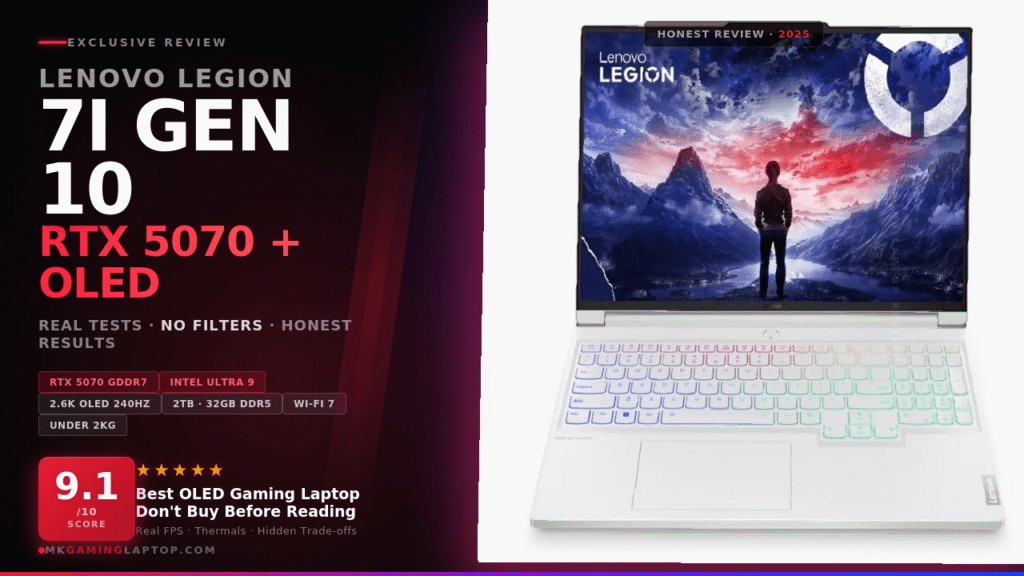

I almost bought the wrong laptop. Twice. The first time I got pulled in by a cheaper machine with similar specs on paper. The second time I nearly went with last gen just to save $200. Then I spent three weeks reading everything I could find, watched more teardown videos than I care to admit, and finally landed on the Lenovo Legion 7i Gen 10 in Glacier White. Here is everything I wish someone had told me before I bought it.
Full Specifications at a Glance
| Component | Specification |
|---|---|
| Processor | Intel Core Ultra 9 275HX — P-cores up to 5.40 GHz, E-cores up to 4.60 GHz |
| GPU | NVIDIA GeForce RTX 5070 8GB GDDR7 — 115W TGP, 2347 MHz boost, 798 AI TOPS |
| Display | 16" OLED 2560×1600 (2.6K), 240Hz, 500 nits, 100% DCI-P3, G-SYNC, DisplayHDR True Black 1000 |
| RAM | 32GB DDR5-5600 (2×16GB dual-channel SO-DIMM) — upgradeable to 64GB |
| Storage | 2TB (1TB + 1TB) PCIe 4.0 x4 NVMe M.2 — both slots filled |
| Wireless | Wi-Fi 7 (802.11be) 2×2 + Bluetooth 5.4 |
| Camera | 5MP with electronic shutter |
| Battery | 84Whr 4-cell — up to 8 hrs light use, 245W adapter |
| Weight | Under 2.0 kg (4.52 lbs) |
| OS / Color | Windows 11 Home 64-bit — Glacier White |
The OLED Display: Why This Changes Everything
2560×1600 at 240Hz Is a Weird Sweet Spot — in the Best Way
Most people argue about 1080p versus 4K. The 2.6K resolution on this 16-inch OLED ends up being smarter than both for this use case. At 1080p on a 16-inch screen you see pixels. At 4K the RTX 5070 would struggle to maintain smooth framerates. At 2.6K you get genuinely sharp visuals without hammering the GPU.
Real talk: If you have only ever gamed on an IPS panel, the first time you play a dark scene on this screen will genuinely surprise you. Blacks are not dark gray — they are actually black.
500 Nits and DisplayHDR True Black 1000
Most gaming OLEDs hover around 300 to 400 nits. This panel hits 500 nits. The DisplayHDR True Black 1000 certification means contrast ratio is effectively infinite. Combined with 100% DCI-P3 coverage and Dolby Vision support, this panel does double duty for creative work. You can read more about DisplayHDR True Black 1000 certification standards on VESA's site. For more OLED comparisons, see all our gaming laptop reviews.
Intel Core Ultra 9 275HX: What Those Numbers Mean
The Intel Core Ultra 9 275HX uses a hybrid architecture. P-cores boost up to 5.40 GHz for gaming. E-cores reach 4.60 GHz for background tasks. See the full Intel Core Ultra 9 275HX official specifications on Intel's site.
Tip: Modern AI features in games like DLSS 4 require the CPU to keep feeding frames to the GPU. The Ultra 9 275HX does not become a bottleneck here.
RTX 5070 + GDDR7: The 798 AI TOPS Number You Should Not Skip
GDDR7 Is Not Just a Spec Sheet Number
GDDR7 has meaningfully higher bandwidth than GDDR6X. For the RTX 5070 running at 115W TGP, that bandwidth difference helps maintain performance at 2.6K that GDDR6X would have struggled with. The boost clock of 2347 MHz is competitive with desktop-class RTX 5070 in many scenarios.
Why 798 AI TOPS Matters
The RTX 5070 at 115W still outperforms the RTX 4070 at 140W in most games thanks to architecture improvements. See NVIDIA's full GeForce laptop lineup for context. If you are still deciding between generations, our HP OMEN Ultra Slim RTX 5070 review shows how another RTX 5070 laptop stacks up.
Watch out: The 115W TGP is real — in pure benchmarks, higher-wattage laptops pull ahead. For everyday gaming with DLSS at 2.6K, it is not a practical limitation.
Performance Scores
Memory & Storage: The Setup That Ships
Both SO-DIMM slots are populated with 2×16GB DDR5-5600 in dual-channel — the right configuration out of the box. Each slot supports up to 32GB, giving a 64GB upgrade ceiling. The 2TB configuration ships as two separate 1TB M.2 PCIe 4.0 x4 NVMe drives. Both slots are filled, so there is no open slot for additional storage later.
Glacier White: More Practical Than It Looks
The Glacier White finish is understated in a way I did not expect — premium rather than flashy. The per-key RGB works particularly well against the white chassis. A cool blue or white scheme looks genuinely tasteful. One practical note: white chassis does show fingerprints on the palm rest. A quick wipe keeps it clean.
Connectivity: Wi-Fi 7 and a Thoughtful Port Layout
Wi-Fi 7 (802.11be) with Bluetooth 5.4 is included. The HDMI 2.1 port supports 4K at 120Hz for external monitors. Both USB-C ports output DisplayPort, meaning up to three external displays simultaneously. The Always On USB-A port charges devices while the laptop is powered off. The 5MP camera with electronic shutter is significantly better than the 720p cameras on most gaming laptops.
Battery Life: Honest Numbers
The 84Whr battery is rated up to 8 hours — that applies to light productivity with reduced brightness. Gaming on battery will drain it in 1.5 to 2 hours. For productivity and video, 5 to 6 hours is realistic. The 245W power adapter is large. For travel, see our best lightweight gaming laptops for travel guide.
Tip: Set battery charge limit to 80% in Lenovo Vantage immediately. It significantly extends long-term battery health and most people never do this.
Pros and Cons
- Best-in-class 2.6K OLED display at 240Hz with 500 nits
- RTX 5070 with GDDR7 and 798 AI TOPS for DLSS 4
- Intel Core Ultra 9 275HX up to 5.40 GHz
- 32GB DDR5-5600 dual-channel out of the box
- 2TB dual-drive NVMe PCIe 4.0 storage
- Wi-Fi 7 and Bluetooth 5.4 future-proofing
- Under 2kg chassis — genuinely portable
- 100% DCI-P3 for content creation work
- 5MP camera with electronic shutter
- Physical numpad with per-key RGB
- 115W TGP trails heavier gaming laptops in benchmarks
- 245W power brick is large and travel-unfriendly
- Both M.2 slots filled — no room to add storage
- White finish shows fingerprints on palm rest
- No Thunderbolt 4 — limits eGPU and transfer speeds
- Gaming on battery lasts only 1.5 to 2 hours
- Two separate warranties (Black Tech LLC + Lenovo)
- DLSS 4 benefits limited to supported games
Common Mistakes People Make When Buying This Laptop
Ignoring the Thermal Environment
Thin gaming laptops need airflow. Placing the Legion on a blanket blocks the bottom vents and causes thermal throttling fast. A cooling pad with active airflow extended my sustained gaming performance noticeably.
Never Opening Lenovo Vantage
Lenovo Vantage lets you control fan curves, performance modes, and battery charge limits. Setting a charge limit to 80% significantly extends long-term battery health. Most people never open this software.
Assuming 115W Means Bad Performance
Enable DLSS 4 Quality mode in supported games. The RTX 5070 architecture at 115W beats the previous-gen RTX 4070 at higher wattages in most real-world scenarios.
Important: Update GPU drivers before your first gaming session. Factory images sometimes ship with older drivers. NVIDIA's latest often include optimizations for recent games.
How It Compares to the Competition
| Feature | Legion 7i Gen 10 | Razer Blade 16 (RTX 5070) | ASUS ROG Zephyrus G16 |
|---|---|---|---|
| Panel | 2.6K OLED 240Hz | 2K IPS 240Hz | 2.5K OLED 240Hz |
| GPU TGP | 115W | 150W | 100W |
| Storage | 2TB (dual drive) | 1TB | 1TB |
| Camera | 5MP e-shutter | 5MP | 2MP |
| Weight | Under 2.0 kg | 2.34 kg | 1.85 kg |
| Battery | 84Whr | 95.2Whr | 90Whr |
| Wi-Fi | Wi-Fi 7 | Wi-Fi 7 | Wi-Fi 7 |
Want a broader look at the market? See our ASUS ROG vs Lenovo Legion comparison for more context.
Advanced Tips Most Reviews Miss
- Use Hybrid GPU mode for everyday tasks. Switching modes in Vantage extends battery life by roughly 40% during web browsing versus always-on dGPU mode.
- USB-C PD charging works for light use. A 100W+ PD charger via USB-C maintains battery during productivity tasks — much lighter for travel.
- Check DLSS version per game. Not all games run DLSS 4 yet. Check and update via the NVIDIA App where possible.
- The numpad is physical — not a touch surface. Useful for spreadsheets and data entry.
- Set battery charge limit to 80% in Vantage immediately. Your future self will thank you at the 18-month mark. Also check our best gaming laptop accessories.
The Black Tech LLC Configuration: What You Need to Know
This laptop ships from Black Tech LLC as a customized configuration. The factory packaging may have been opened to install the upgraded storage to reach the 2TB specification. There are two separate warranties: 1-year Black Tech LLC warranty on the upgraded SSD, and 1-year Lenovo Premium warranty on all other components. Know which entity to contact before you need to.
Lenovo Legion 7i Gen 10
Intel Core Ultra 9 275HX · RTX 5070 · 2.6K OLED 240Hz · 2TB · 32GB DDR5 · Glacier White
🛒 Check on AmazonFrequently Asked Questions
Final Verdict
The Lenovo Legion 7i Gen 10 with the Intel Core Ultra 9 275HX, RTX 5070, and 2.6K OLED at 240Hz justifies its price through the display alone — then backs it up with genuinely capable next-gen hardware in a sub-2kg chassis. The 115W TGP puts it behind raw-power-focused competitors in pure benchmarks, and the 245W power brick is not small. But for anyone who spends real time in front of their laptop screen, the OLED makes almost everything else secondary. If you are serious about buying a gaming laptop that will remain relevant for the next several years and actually looks as good as it performs, this is the one.
Best-in-class OLED display, next-gen Intel + NVIDIA hardware, and a sub-2kg chassis. The 115W TGP is a real tradeoff — but for display-first gamers and creators, nothing else at this price comes close.