
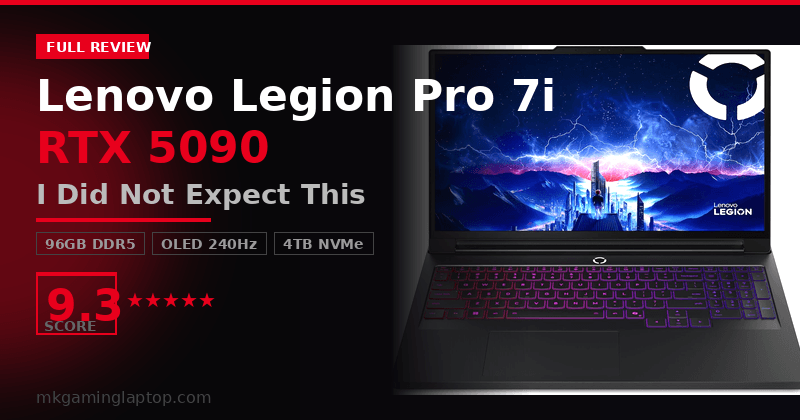
Lenovo Legion Pro 7i RTX 5090:
I Did Not Expect This

I’ve tested a lot of gaming laptops over the years. Most of them disappoint me somewhere. When I got my hands on the Lenovo Legion Pro 7i Gen 10 with the RTX 5090, I went in skeptical. A 5090 in a laptop? At 175W TGP? After weeks of heavy use and real gaming sessions, here is my full, honest take.
Who Is This Laptop Actually For?
Before we get into specs, let me be straight with you. This machine is not for casual gamers. It is not for people who want a light travel laptop.
It is for people who want the absolute best gaming performance in a portable form factor and do not want to compromise on the display. If you are still comparing options, check our roundup of the best gaming laptops of 2026 first. If this is already your target, keep reading.
First Impressions: Build and Display
The Eclipse Black finish looks clean in a way that is hard to describe until you see it in person. It does not look flashy or gamer-y from across a room. It looks like a serious machine.
At 13.58 x 10.05 x 0.79 inches and 4.19 lbs, it sits in a weird sweet spot. Not ultrabook thin, but genuinely portable for what it is packing inside.
The OLED Panel Is Not a Gimmick
This is a 16″ WQXGA OLED running at 2560×1600 with a 240Hz refresh rate. It hits 500 nits in SDR and supports DisplayHDR True Black 1000, which means the blacks are actually black.
100% DCI-P3 coverage means colors in games and media are rendered with accuracy that most gaming laptops do not come close to — including the MSI Stealth 18 AI Studio, which uses a Mini LED panel instead. Dolby Vision and G-SYNC are both on board. Frame tearing was essentially nonexistent during gaming sessions.
The RTX 5090 in a Laptop: Honest Performance
This is the part everyone wants to know about.
The 175W TGP Situation: What You Need to Know
A lot of people get confused when they see that number. The full specs are listed on NVIDIA’s official RTX 50 Series laptop page. Here is the honest explanation: Lenovo runs the 5090 at 175W in Performance Mode. When you push it with the AC adapter plugged in, it stays there. Thermal throttling only showed up during extremely long stress tests in a warm room.
If you run it unplugged, performance drops significantly. That is expected. This is not a battery-powered gaming machine; it is a plugged-in machine that happens to be portable.
Intel Core Ultra 9 275HX: The CPU Side
The Intel Core Ultra 9 275HX has P-cores up to 5.40 GHz and E-cores up to 4.60 GHz. In gaming, the CPU almost never becomes a bottleneck. The GPU is always the story here.
Where the 275HX shines is in mixed workloads. Streaming while gaming, running background tasks, or using this as a daily driver for intensive productivity all felt smooth and responsive.
Full Specifications
| Component | Specification |
|---|---|
| CPU | Intel Core Ultra 9 275HX — P-cores up to 5.40 GHz, E-cores up to 4.60 GHz |
| GPU | NVIDIA GeForce RTX 5090 24GB GDDR7 — Boost 2160MHz, TGP 175W, 1824 AI TOPS |
| Display | 16″ WQXGA OLED 2560×1600, 500 nits, 100% DCI-P3, 240Hz, G-SYNC, HDR True Black 1000 |
| RAM | 96GB DDR5-6400 (2×48GB SO-DIMM, dual-channel) |
| Storage | 4TB NVMe SSD PCIe 4.0 · One extra M.2 slot (PCIe 5.0 x4) |
| Wireless | Wi-Fi 7 (802.11be 2×2) + Bluetooth 5.4 |
| Ports | 2× USB-C (DP + PD), 4× USB-A, HDMI 2.1, RJ-45 LAN, Combo Jack |
| Camera | 5MP E-Shutter |
| Battery | 80Whr 4-cell — up to 8 hrs light use |
| Adapter | 245W AC Adapter |
| Dimensions | 13.58 × 10.05 × 0.79 in — 4.19 lbs |
| Color | Eclipse Black |
| OS | Windows 11 Home 64-bit |
Battery Life: Real Numbers vs. Hype
Lenovo advertises up to 8 hours of battery life in non-gaming use. In my actual daily use (web browsing, writing, YouTube, 50% brightness), I got between 5 and 6.5 hours. That is real-world, not lab numbers.
The moment you start gaming, battery life becomes irrelevant. You need the 245W AC adapter plugged in for full performance. The adapter is large. Plan your bag space accordingly.
Pros & Cons
✓ What I Loved
- OLED display is genuinely stunning at 240Hz
- RTX 5090 handles everything at 1600p with headroom
- 96GB DDR5 and 4TB storage — nothing to upgrade
- Wi-Fi 7 noticeably lowers online game latency
- 5MP E-Shutter camera is best-in-class for gaming laptops
- PCIe 5.0 M.2 slot ready for future upgrades
- 4.19 lbs for this hardware is impressive
✗ What to Watch Out For
- 245W brick is large to travel with
- Gaming on battery cuts GPU performance significantly
- Not a desktop 5090 — 175W TGP gap is real
- Gets warm under sustained load in a hot room
- Premium price point
5 Mistakes Buyers Make
Expecting Desktop 5090 Performance
The 175W TGP is real. Manage expectations and you will be thrilled. Compare it to a desktop and you will create unnecessary disappointment.
Leaving the Power Adapter at Home
This machine needs its 245W brick for peak performance. Gaming without it defeats the purpose. It is big. Always travel with it.
Gaming on Battery Power
Performance drops significantly unplugged. Always game plugged in, no exceptions.
Staying in Balanced Mode
Out of the box, Lenovo Vantage defaults to Balanced Mode. Switch to Performance Mode for gaming. The difference in sustained GPU performance is noticeable.
Not Optimizing Display Settings
The OLED ships with settings that are not fully calibrated. Spend five minutes in Windows display settings and Vantage. It makes the screen even better.
RTX 5090 vs RTX 4090 Laptop
If you are also weighing the MSI Vector 16 HX AI with RTX 5080, read that review alongside this one before deciding.
| Legion Pro 7i Gen 10 RTX 5090 | RTX 4090 Laptop (Typical) | |
|---|---|---|
| VRAM | 24GB GDDR7 | 16GB GDDR6 |
| Display | OLED 240Hz G-SYNC | IPS/MiniLED varies |
| AI TOPS | 1824 | ~330 |
| DLSS Gen | DLSS 4 + Frame Gen | DLSS 3 |
| RAM | 96GB DDR5-6400 | 32–64GB DDR5 |
| Wireless | Wi-Fi 7 | Wi-Fi 6E typically |
Insider Tips Most Reviews Miss
Enable DLSS 4 Frame Generation
The RTX 5090 is purpose-built for this. NVIDIA DLSS 4 with Multi Frame Generation makes games feel dramatically smoother, and image quality beats DLSS 3 at launch.
The PCIe 5.0 Slot Is Waiting
The empty M.2 PCIe 5.0 slot means when fast drives get affordable, you can slot one in without replacing anything.
Monitor Thermals with HWiNFO64
The cooling is good, but keeping an eye on temps in long sessions is smart. A cooling pad in a warm room makes a measurable difference.
Enable E-Shutter on the Camera
The 5MP camera’s E-Shutter cuts motion blur in video calls. Enable it in Lenovo software if video call quality matters.
Final Verdict
The Lenovo Legion Pro 7i Gen 10 with the RTX 5090 is the most capable gaming laptop I have used. The OLED display alone is worth the upgrade from a non-OLED competitor. The RTX 5090 handles everything at native resolution with headroom. The 96GB RAM and 4TB storage mean you will not be scrambling for space anytime soon.
If you are serious about gaming performance and want a machine that keeps up with next-gen titles for years, this is the one. If budget is a concern, the HP Omen Max 16 with RTX 5070 is worth a look at a lower price point.