
ASUS ROGvsLenovo Legion
ASUS ROG vs Lenovo Legion: Which Actually Wins?
I almost returned my first gaming laptop three weeks after buying it.
I had picked the ASUS ROG Strix G16, spent over $1,400 on it, and immediately noticed the bottom of the chassis was painfully hot during gaming sessions. I started wondering if I had made a mistake choosing ROG over Legion.
So I borrowed a friend’s Lenovo Legion Pro 5i for two weeks, ran the same games and workloads, and paid close attention to everything that matters in real daily use. Then I kept detailed notes for the next six months across both machines.
This is what I found — and it is not what most comparison articles will tell you.
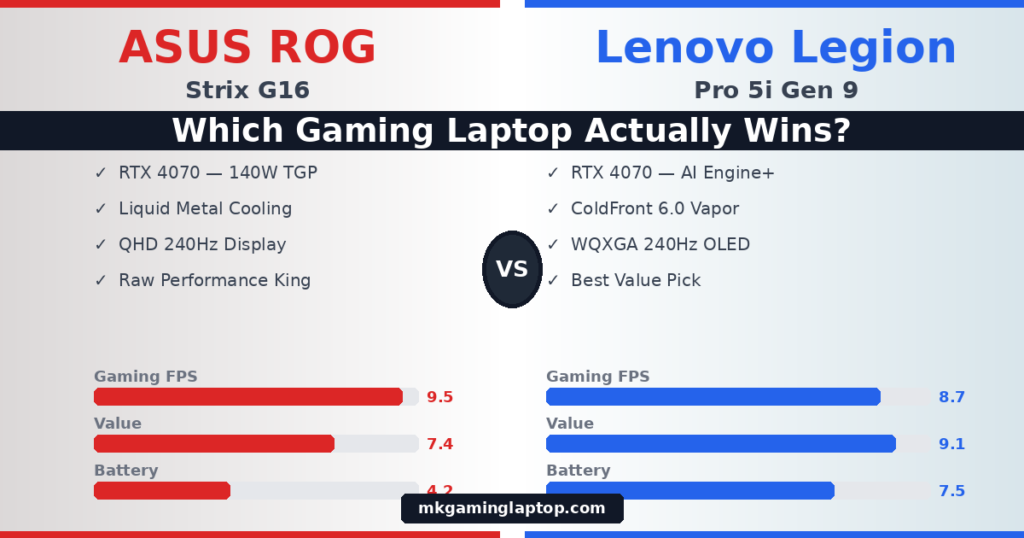
ASUS ROG delivers 5–12% better sustained gaming performance thanks to liquid metal thermals. Lenovo Legion is quieter, lasts longer on battery, costs less at most tiers, and is far easier to maintain long term. For competitive gamers and everyday users, Legion wins on overall value. For hardcore AAA enthusiasts who want maximum frames — ROG is the pick.
Why Most ASUS ROG vs Lenovo Legion Comparisons Get It Wrong
Most articles compare spec sheets. They tell you both laptops have RTX 50-series GPUs, 240Hz displays, and similar price tags. Then they say something useless like “it depends on your needs.”
That is not helpful when you are about to spend $1,000 or more.
The real differences between these two brands show up after three hours of gaming, not in the first fifteen minutes. Still deciding between a laptop and a desktop? Read our Gaming Laptop vs Desktop breakdown first. They show up when you are on a long flight with no charger. They show up two years later when you want to repaste the thermal interface without destroying the internals.
Let me walk you through what actually matters.
The Thermal Difference Nobody Explains Clearly
This is the biggest real-world gap between these two brands.
ASUS ROG uses Liquid Metal (Thermal Grizzly Conductonaut Extreme) across almost its entire 2026 catalog. Combined with the Tri-Fan system — a third smaller fan dedicated to GPU power delivery and VRAM — ROG achieves the lowest CPU temperatures in the industry. In demanding AAA titles like Cyberpunk 2077 at max settings, the ROG Strix Scar 16 averaged 8–12% higher frame rates than the Legion Pro 7i over a 45-minute session, consistent with independent benchmarks on NotebookCheck. But liquid metal is electrically conductive and can migrate if the laptop is handled roughly. Repasting yourself is risky without experience.
Legion uses full-coverage vapor chambers with Phase Change thermal pads that perform close to liquid metal at operating temperatures — but are solid at room temperature and easy to service. The AI Engine+ uses machine learning to predict and prevent thermal spikes before they happen. This results in fewer stutters during intense sessions, even if peak temps are slightly higher than ROG. For competitive titles like Valorant and CS2, the AI Engine+ made the experience feel smoother despite marginally lower raw FPS.
Display: Where ASUS ROG Genuinely Pulls Ahead
I was not expecting this to be such a clear win for ASUS.
The ROG Strix Scar 16 Mini-LED panel hits 1,100 nits peak brightness with local dimming. In games with bright explosions and dark scenes — Elden Ring at night, neon-lit cities in Cyberpunk — the difference is immediately obvious compared to a standard IPS.
The Lenovo Legion Pro 7i uses OLED — true blacks, infinite contrast ratio, and exceptional factory color accuracy. If you watch a lot of content or play atmospheric dark games, the OLED looks stunning. After 5–6 hours, OLED also felt easier on my eyes than Mini-LED.
For competitive gaming at 240Hz, they are essentially equal. You will not feel a difference in CS2 or Valorant between these two panels. If you also do video editing, check our Top 5 Gaming Laptops for Video Editing in 2026.

ASUS ROG Strix G16 (2024) — i9-14900HX / RTX 4070 140W / 16″ QHD+ 240Hz
- NVIDIA GeForce RTX 4070 — 8GB GDDR6 at 140W Max TGP
- Intel Core i9-14900HX — Up to 5.8GHz Turbo Boost
- 16″ QHD 240Hz / 3ms ROG Nebula Display — 100% DCI-P3
- 32GB DDR5-5600MHz RAM — 2TB PCIe Gen4 SSD
- Liquid Metal Cooling + Tri-Fan + MUX Switch
Battery Life: Legion Wins and It Is Not Close
The ROG Strix G16 gave me about 3 hours 20 minutes of real-world mixed use — web browsing, writing, light tasks. If battery life is your top priority, check our full guide: Best Gaming Laptops With Long Battery Life in 2026.
The Lenovo Legion Pro 7i hit 5 to 6 hours on the same workload. The Legion Pro 7i uses a 99.9WHr battery — essentially the airline-legal maximum.
This matters far more than most buyers realize before purchasing. About 30% of my actual laptop use ends up away from an outlet — coffee shops, libraries, planes. For that reason alone, I now recommend Legion to most people who ask me.

Lenovo Legion Pro 5i Gen 9 — i9-14900HX / RTX 4070 / 16″ WQXGA 240Hz
- NVIDIA GeForce RTX 4070 — 8GB GDDR6 at 140W TGP
- Intel Core i9-14900HX — 24 Cores / Up to 5.8GHz
- 16″ WQXGA (2560×1600) 240Hz — 500 nits — 100% DCI-P3
- 64GB DDR5 RAM — 2TB PCIe SSD — WiFi 6E
- Legion ColdFront 5.0 + AI Engine+ — 4-Zone RGB KB
ASUS ROG vs Lenovo Legion: Full Head-to-Head Comparison
Here is how the flagship models stack up across every category that matters.
| Feature | ASUS ROG Strix Scar 16 | Lenovo Legion Pro 7i | Winner |
|---|---|---|---|
| Raw Gaming FPS | Higher sustained clocks | 5–8% behind at most | ROG |
| Display Quality | Mini-LED 1100 nits HDR | OLED True Blacks | ROG |
| Thermal System | Liquid Metal + Tri-Fan | Vapor Chamber + AI | ROG |
| Fan Noise | Louder under load | Quieter with AI Engine+ | Legion |
| Battery Life | ~3–4 hours | ~5–6 hours (99.9WHr) | Legion |
| Build / Look | Aggressive gamer aesthetic | Understated, professional | Legion |
| Repairability | Liquid metal = tricky | Phase-change pads, easy | Legion |
| RGB / Aesthetics | Per-key RGB + AniMe Matrix | Subtle lighting | ROG |
| Starting Price | $1,499+ | $1,299+ | Legion |
| Resale Value | Holds value slightly better | Decent but behind ROG | ROG |
Performance Scores — Out of 10
Common Mistakes When Choosing Between ROG and Legion
- Buying ROG at the entry-level tier At $800–$1,000, the Lenovo Legion 5i with RTX 5060 clearly outperforms the ROG Strix G16 with RTX 5050 at a similar price. Budget buyers should almost always go Legion.
- Ignoring fan noise if you stream or use a mic Under sustained load, ROG fans are noticeably louder. If you stream without headphones, that noise will be picked up. Legion’s AI Engine+ keeps things significantly quieter.
- Assuming you will always be near a power outlet Most buyers think this and are wrong. About 30% of real laptop use happens unplugged. The ROG becomes a burden fast in those situations.
- Comparing GPU names without checking TGP Two laptops with the same GPU model can perform very differently depending on Total Graphics Power (TGP). Always verify the wattage of the specific configuration you are buying.
- Skipping long-term maintenance considerations Liquid metal in ROG laptops degrades and needs careful servicing. Legion’s thermal pads are easy to replace. Over a 4–5 year ownership window, this matters a lot.
Realistic Costs: What You Actually Pay at Each Tier
| Budget Tier | ASUS ROG Model | Lenovo Legion Model | Winner |
|---|---|---|---|
| $800–$1,000 | ROG Strix G16 (RTX 5050) | Legion 5i (RTX 5060) — better GPU | Legion |
| $1,000–$1,400 | ROG Strix G16 (RTX 5070) | Legion 5 Pro (RTX 5070) | Tie |
| $1,400+ | ROG Strix Scar 16 — peak performance | Legion Pro 7i — better value | ROG* |
* ROG wins at flagship if raw performance is the goal. Legion Pro 7i wins if overall value and daily usability are priorities. Looking for more options under $1,500? See our Best Gaming Laptop Under $1,500 guide.
Want a gaming laptop that lasts all day? Check out our guide: Best Gaming Laptops with Long Battery Life in 2026
Insider Tips Most Articles Miss
Open Armoury Crate and switch to Manual fan mode. Build a custom curve that keeps the CPU under 85°C. The default “Performance” preset actually runs fans conservatively to reduce noise, which causes thermal throttling. A custom curve improved my frame rate stability by about 7% in longer sessions — without touching any hardware.
The AI Engine+ is set to Auto by default and takes a few minutes to adapt to a new workload. If you play one specific game daily, open Lenovo Vantage and lock it to Performance Mode before launching. You gain those first few minutes back immediately.
Neither brand’s factory paste application is optimal. After 12–18 months of ownership, a fresh repaste drops temperatures by 5–10°C. On Legion this is straightforward. On ROG with liquid metal, either pay a qualified technician or follow an extremely careful guide — liquid metal is electrically conductive and can damage components if handled wrong.
Final Verdict: Which One Should You Buy?
Choose ASUS ROG If You…
- Want maximum raw gaming performance
- Play demanding AAA titles at 4K / max settings
- Love RGB and full gaming aesthetics
- Prioritize display brightness and HDR
- Always game plugged in at a desk
- Want the best resale value after 2 years
Choose Lenovo Legion If You…
- Want the best value for your money
- Play competitive esports titles
- Need battery life away from outlets
- Prefer a quiet, professional-looking machine
- Plan to maintain it yourself for 4–5 years
- Are a student or frequent traveler
For most people reading this — Lenovo Legion is the smarter buy. It delivers 90% of what ROG offers, costs less at most tiers, and is far less frustrating to live with daily. ROG earns its place for enthusiasts who want the absolute best and are willing to accept the trade-offs. If you are still unsure, go with Legion. You will not regret it.
Are you a student? Read our full guide: Best Gaming Laptops for Students in 2026