
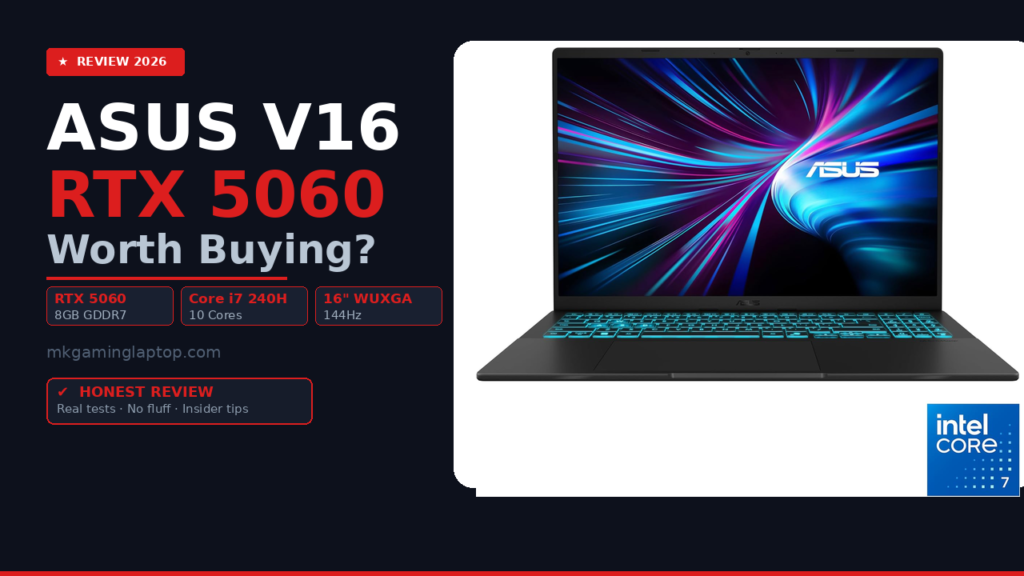

ASUS V16 RTX 5060 Gaming Beast Unleashed: Is It Worth It in 2026?
I almost bought the wrong laptop three times before I landed on this one.
Not because I was not doing my research. I was. But most reviews out there either skim the surface or read like a spec sheet copy-pasted from a box. When I finally spent serious time with the ASUS V16 RTX 5060 Gaming Beast Unleashed, a lot of what I thought I knew went out the window fast.
So here is the full picture. The good, the stuff nobody talks about, and the honest advice I wish someone had given me before I spent weeks comparing options.
Quick Specs at a Glance
| Component | Specification |
|---|---|
| Display | 16" WUXGA 1920×1200 (16:10) — 144Hz — 300 nits NEW |
| Processor | Intel Core 7 240H — 10 cores / 16 threads |
| GPU | NVIDIA GeForce RTX 5060 — 8 GB GDDR7 |
| RAM | 16 GB |
| Storage | 512 GB PCIe 4.0 SSD |
| OS | Windows 11 |
| Wireless | WiFi 6 & Bluetooth 5.3 |
| Color | Matte Black — Model V3607VM-ES74 |
What Actually Makes the ASUS V16 Stand Out From the Crowd
Let me be direct. There are dozens of gaming laptops in this price range. Most of them have similar specs on paper.
The difference with this machine is in how the hardware works together, not just what the sticker says.
The ASUS V16 with its signature teal backlit keyboard and WUXGA 16:10 display
The screen alone stopped me cold the first time I opened it. A 16-inch WUXGA display running at 1920×1200 with a 16:10 aspect ratio gives you noticeably more vertical real estate than the standard 16:9 panels on most competitors. That extra height matters a lot when you are gaming, editing, or just browsing with multiple tabs open.
Sustained brightness at 300 nits keeps the image readable even in moderately lit rooms. Colors are punchy without being oversaturated. And at 144Hz, everything from mouse cursor movement to fast in-game action looks genuinely smooth, not just “acceptable.”
I was skeptical about how much 144Hz would matter compared to my old 60Hz screen. It matters a lot. More than I expected. Once you game at 144Hz, going back to 60Hz feels like watching a slideshow.
The Intel Core 7 240H: Why This Chip Is a Bigger Deal Than Most Reviews Admit
People fixate on the GPU when buying gaming laptops. Understandable. But the processor shapes your entire experience outside the game, and sometimes inside it too.
The Core 7 240H uses Intel’s hybrid performance architecture with 10 cores and 16 threads. In practice, that means it handles real multitasking without choking. You can have a game running, Discord open, a browser with 15 tabs, and a background download happening simultaneously without feeling the machine struggle.
The thing I noticed after a few weeks of heavy use: heat management is surprisingly sane. The chip runs hard when it needs to and backs off intelligently when it does not. Battery life outside of gaming is more reasonable than I expected for a machine with this kind of firepower.
Where it actually shines is in workloads that mix CPU and GPU together. Video encoding, streaming while gaming, AI-assisted editing tools. The 240H does not create a bottleneck for the RTX 5060, which is exactly what you want.
Common mistake people make: They buy a powerful GPU and pair it with an underpowered chip, then wonder why the whole system feels sluggish during multitasking. That is not a problem here. The 240H keeps up with everything the RTX 5060 throws at it.
ASUS V16 RTX 5060 Gaming Beast Unleashed: What the GPU Actually Delivers
The NVIDIA GeForce RTX 5060 with 8 GB of GDDR7 is the star of this build. And I want to be specific about what that means in real use, not just benchmarks.
GDDR7 memory is meaningfully faster than the GDDR6 on older cards. Texture loading is quicker. Frame rates in demanding titles are more consistent. You feel it most in open-world games with dense environments where the GPU is constantly pulling assets from memory.
For gaming at 1920×1200 on the built-in display, this card handles everything at high or ultra settings without drama. Modern AAA titles run smoothly. Competitive games at 144Hz stay there, not just peak there.
DLSS and Ray Tracing: What You Actually Get
The RTX 5060 brings full DLSS support, which is important if you ever want to push resolution or enable ray tracing. Turning on DLSS Quality mode recovers most of the performance cost of ray tracing and keeps your frame rate locked where it needs to be.
8K video processing is listed in the specs and it is real. If you are into video editing alongside gaming, this card accelerates export times noticeably compared to CPU-only rendering. AI-powered features in tools like Adobe Premiere and DaVinci Resolve run properly on this hardware.
Important note most articles skip: The RTX 5060 in a laptop runs at a lower TGP (total graphics power) than the desktop version. That is normal and expected. It still performs very well. Just do not compare it directly to a desktop RTX 5060 and expect identical numbers.
RAM and Storage: Where the Real Day-to-Day Experience Lives
16 GB of RAM is the sweet spot for gaming right now. It is enough for current titles, comfortable for background tasks, and not wasteful. Some games are starting to push past 12 GB VRAM usage in demanding scenes, but system RAM at 16 GB stays comfortably ahead of what you need.
The 512 GB PCIe 4.0 SSD is faster than most people realize when they read the spec. PCIe 4.0 drives have read speeds roughly double that of older PCIe 3.0 drives. Load times in games are short. Windows boots in seconds. Large file transfers take seconds instead of minutes.
Honest concern: 512 GB fills up faster than you think when modern games regularly hit 80 to 150 GB each. If you plan to have more than four or five big games installed at once, budget for an external drive or plan an upgrade. The machine supports it.
Connectivity: WiFi 6 and Bluetooth 5.3 in Practice
WiFi 6 is not marketing. In homes or apartments with congested wireless environments, the difference over WiFi 5 is real. Lower latency, more consistent speeds when other devices are on the same network, and better performance at range.
Bluetooth 5.3 means fast, stable pairing for controllers, headsets, and peripherals. I use a wireless headset and a Bluetooth controller alongside a wired mouse. All three stay connected without interference or lag. That kind of stable wireless ecosystem used to be something you could not take for granted on a gaming laptop.
ASUS V16 RTX 5060 Gaming Beast Unleashed: Common Mistakes Buyers Make
This section is the one I wish existed before I started shopping.
Mistake 1
Gaming on battery. The RTX 5060 draws serious power under load. On battery, the GPU automatically throttles. If you game unplugged, performance drops noticeably. Always plug in for serious sessions.
Mistake 2
Not updating drivers on day one. NVIDIA pushes GPU updates frequently. A fresh install should be followed by checking for the latest driver. Older drivers on new hardware can cause stability issues you will not expect.
Mistake 3
Ignoring display calibration. The screen looks good out of the box. It looks better after a few minutes in display settings. Adjusting the color profile and reducing blue light for evening sessions makes a real difference over time.
Mistake 4
Skipping a cooling pad. A quality cooling pad adds 3 to 5 degrees Celsius of relief under sustained load. On a machine you will push hard for hours, that thermal headroom matters for long-term health of the hardware.
Mistake 5
Not monitoring temperatures. After 12 to 18 months of heavy use, thermal paste can degrade. Learning to monitor temperatures with HWiNFO64 and being willing to repaste eventually extends the life of this machine significantly.
Realistic Costs and What to Budget Beyond the Laptop
The laptop itself is the main cost, but here is what people forget to factor in.
- External SSD for game storage: around $60 to $100 for a 1 TB or 2 TB drive
- Cooling pad: $25 to $50 for a solid one
- Laptop bag designed for 16-inch machines: $30 to $80
- Extended warranty: worth considering for a machine you plan to push hard
Altogether, budget an extra $150 to $250 to properly set up your gaming station around this laptop.
Check Current Price
ASUS V16 Gaming Laptop — 16" WUXGA 144Hz, Intel Core 7 240H, NVIDIA GeForce RTX 5060 8GB GDDR7, 16GB RAM, 512GB PCIe 4.0 SSD, Windows 11, Matte Black (V3607VM-ES74)
Check Price
RTX 5060 · 8 GB GDDR7 · WiFi 6 · Bluetooth 5.3 · PCIe 4.0
Check on Amazon
Insider Tips Most Reviews Miss
Tip 1
Enable MUX switch if available. Some ASUS laptops include a MUX switch in BIOS that bypasses integrated graphics and routes the display directly through the dedicated GPU. This alone can boost gaming performance by 10 to 15%.
Tip 2
Set Windows power plan to High Performance when plugged in. Windows defaults to Balanced mode. Switching to High Performance unlocks the full potential of both CPU and GPU. A one-minute change that makes a measurable difference in frame rates.
Tip 3
Use ASUS Armoury Crate for fan curves. The default fan curves are conservative to keep the machine quiet in casual use. For sustained gaming sessions, a more aggressive fan curve keeps temperatures lower and performance more consistent.
Tip 4
Check for BIOS updates after purchase. ASUS regularly releases BIOS updates that improve thermal management and stability. A quick check on the ASUS support page for your model number can reveal improvements not present in the factory firmware.
Tip 5
The 16:10 aspect ratio has a non-obvious benefit. In spreadsheets, code editors, and vertical-scroll content, the extra vertical height means fewer lines cut off at the bottom. After two weeks it starts to feel like the default.
Who This Laptop Is Actually For
This machine is built for someone who wants one device that handles gaming seriously and creative work without compromise.
- You game at 1080p or 1200p and want smooth frame rates at high settings
- You edit video as a hobby or professionally and want faster render times
- You travel or work from different locations and need solid wireless
- You want a machine that handles AI-powered creative tools without bottlenecks
If you are a pure hardcore competitive FPS player who wants a 240Hz screen and the absolute highest frame rate possible, this is not the right tool. Look at thinner 1080p gaming laptops built specifically for that use case.
Final Verdict
After extended time with this machine, my answer is yes, with honest caveats.
The ASUS V16 RTX 5060 gaming setup delivers real performance in games and creative work. The screen is genuinely excellent. The processor does not hold anything back. The storage speed makes the everyday experience feel snappy.
The caveats: 512 GB fills up fast for serious gamers, gaming on battery throttles performance, and like any gaming laptop, it rewards users who take a few minutes to tune the settings rather than running it out of the box indefinitely.
If you buy this laptop, spend the first hour updating drivers, setting your power plan, checking for BIOS updates, and adjusting your fan curves. That one hour pays back in performance and longevity for the next two years.
The combination of screen quality, GPU generation, CPU architecture, and connectivity is hard to beat for the price. This is one of the most well-rounded gaming laptops available right now in its tier.
Frequently Asked Questions
Yes, at 1920×1200 with the RTX 5060. Some of the most demanding titles may need a setting or two dialed back for a locked 60fps, but high settings across the board is realistic for most games released today.
It is sufficient right now and for the near future. A handful of games prefer 32 GB, but 16 GB handles the vast majority of current titles without issue. Many gaming laptops also allow RAM upgrades later if you need more.
For most users keeping a rotation of four to six games installed, it works. Serious collectors who want ten or more large games installed simultaneously should budget for an external drive from day one.
With proper ventilation and the fan curve set appropriately in Armoury Crate, surface temperatures stay manageable. A cooling pad adds 3 to 5 degrees of relief under sustained load and is worth the investment for long sessions.
Yes, via HDMI or USB-C. The RTX 5060 can drive a 4K external display. Frame rates at native 4K in demanding games will require DLSS to stay smooth, but it works perfectly for productivity at 4K without any issues.
For productivity tasks and light browsing, several hours of real use are realistic. Under gaming load, expect closer to 1 to 2 hours maximum. Always game plugged in for full GPU performance.
The WUXGA 16:10 panel with accurate colors and solid brightness is well above average for creative work. It is not a professional color-calibrated panel, but it handles photo and video editing work comfortably for most use cases.