

Introduction to the best wireless gaming mouse under 100 buyer guide
Unlock the ultimate gaming advantage without breaking the bank. Discover the best wireless gaming mouse under 100 buyer guide that blends precision, speed, and comfort in one sleek package. Imagine flawless flicks, lag-free movement, and effortless control at your fingertips. Don’t settle for mediocrity—explore this guide and transform your gaming setup today.
Why a wireless gaming mouse under 100 is more than enough today
Wireless technology has matured in leaps and bounds. What was once exclusive to premium gear now trickles down into affordable models. Modern sensors are sharper, latency is practically imperceptible, and build quality has improved across the board. For most gamers, a wireless gaming mouse under 100 delivers all the essentials for competitive and casual play alike—proof that high performance no longer demands a high price tag.
Who this best wireless gaming mouse under 100 buyer guide is for
This guide is tailored for gamers who value performance but refuse to overspend. It’s perfect for FPS grinders chasing pixel-perfect aim, MMO players juggling complex hotkeys, and casual gamers seeking smooth, reliable control. If you want value without compromise, this guide is your compass.
What really matters in a wireless gaming mouse
Forget buzzwords and flashy marketing. The essentials are simple: sensor accuracy, stable wireless connectivity, ergonomic design, and dependable buttons. These factors will make more difference in your performance than exotic coatings, gimmicky RGB, or overcomplicated features.
Sensor types explained in plain English
At its core, a mouse sensor tracks movement. That’s it. Optical sensors dominate the modern market because they are consistent, precise, and low-maintenance. Laser sensors still exist, but optical options often offer superior control for gaming. Even budget models now feature sensors that were considered premium just a few years ago.
DPI myths and what numbers actually matter for gaming
High DPI numbers do not automatically equate to better aim. In reality, most gamers thrive between 400 and 1600 DPI. Anything beyond that is often marketing fluff. What truly matters is DPI consistency and the ability to tweak sensitivity to match your personal play style.
Polling rate made simple for everyday gamers
Polling rate refers to how often your mouse reports its position to your computer. A 1000Hz polling rate updates every millisecond, ensuring fluid movement. Even under $100, many wireless mice now hit this sweet spot reliably, giving you responsive, lag-free control.
Wireless technology and why lag is no longer an issue
Modern wireless mice utilize optimized 2.4GHz connections. Latency differences compared to wired mice are negligible, meaning you won’t notice delays even in fast-paced, competitive scenarios. Wireless gaming has finally caught up with the demands of professional play.
Battery life expectations under the 100 price point
Battery life varies by model, but most wireless mice under 100 offer 40–100 hours per charge. Efficiency has improved drastically, so frequent recharging is no longer a burden. Some models, like the Logitech G602, can last for weeks on standard batteries.
Rechargeable vs replaceable batteries
Rechargeable batteries are convenient, eco-friendly, and reduce clutter. Replaceable batteries offer flexibility and rapid swaps if you forget to charge. Neither option is objectively superior; your choice depends on whether you value plug-and-play simplicity or long-term convenience.
Weight and balance and how they affect aim
Weight dramatically influences control. A well-balanced mouse feels like an extension of your hand. Too light can feel twitchy, while too heavy may cause fatigue over long sessions. Many budget models under $100 strike an elegant balance, ensuring comfortable control without compromise.
Lightweight mice vs heavier mice for different play styles
FPS players usually favor lightweight mice for rapid flicks and micro-adjustments. Heavier mice, on the other hand, feel more grounded, appealing to players who prefer deliberate, methodical movements. Knowing your preferred style makes this choice easier.
Mouse shape and grip styles explained
Shape dictates comfort. A mouse should complement your natural grip, not force your hand into unnatural positions. Ergonomic designs cater to marathon sessions, while symmetrical mice offer versatility for ambidextrous users and varied grip styles.
Palm grip friendly wireless gaming mice
Palm grip enthusiasts benefit from larger mice with gentle curves and full-hand support. These designs reduce strain and offer stability during long gaming marathons, ensuring fatigue-free sessions.
Claw grip and fingertip grip considerations
Claw and fingertip grips thrive with compact designs featuring pronounced button placement. Lighter, shorter mice allow for rapid input and agile movements, perfect for high-speed FPS or MOBAs.
Button quality and click feel differences
Clicks should feel crisp, responsive, and consistent. Mushy or inconsistent buttons reduce confidence and precision. Quality switches deliver tactile feedback and can endure millions of presses, even in budget mice under $100.
Extra buttons and when they actually help
Extra buttons excel in MMOs, MOBAs, or productivity tasks. FPS players may benefit more from a streamlined setup to avoid accidental presses. Always prioritize functional utility over novelty.
Build quality and durability under heavy gaming use
A solid mouse can endure intense gaming without creaks, flexing, or premature wear. Look for reinforced shells, robust scroll wheels, and durable feet—features increasingly common in sub-$100 models.
RGB lighting under 100: cool feature or pure marketing
RGB can be aesthetically pleasing, but it can also drain battery and inflate cost. Under $100, RGB should be considered a bonus, not a deciding factor. Always prioritize performance over glowing aesthetics.
Software support and ease of customization
Reliable software allows DPI adjustment, button remapping, and profile management. Clean interfaces with stable updates matter more than endless, complicated options. Programs like Logitech G and Razer are good examples.
Compatibility with PC laptops and consoles
Most wireless gaming mice under 100 work seamlessly with Windows and macOS. Some models even extend support to consoles, making them versatile for multi-platform gamers.
Best wireless gaming mouse under 100 for FPS players
- Logitech G305 LIGHTSPEED – lightweight, low latency, and precise.

- Razer Basilisk X HyperSpeed – ergonomic and snappy, perfect for fast-paced shooters.
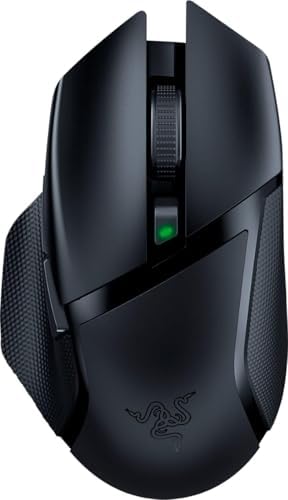
Best wireless gaming mouse under 100 for MMO and MOBA games
- Redragon M686 Vampire Elite – budget-friendly with macro functionality.

- Razer Naga X – 16 buttons ideal for MMOs.

Best wireless gaming mouse under 100 for casual gamers
- SteelSeries Rival 3 Wireless – smooth performance, long battery life.
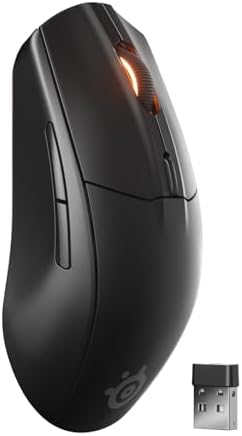
- HyperX Pulsefire Haste Wireless – lightweight, comfortable, and easy to use.

Common mistakes buyers make when choosing a wireless gaming mouse
- Chasing extreme DPI numbers without understanding their purpose.
- Ignoring hand size and grip style.
- Prioritizing RGB aesthetics over performance.
How to avoid overpaying for features you do not need
Focus on your gaming style first. FPS players don’t require 16 extra buttons. Casual gamers don’t need 1000Hz polling rates. Simplicity often leads to the best value.
How to spot real value vs marketing hype
Real value is revealed through performance consistency, verified user reviews, and long-term reliability. Hype fades, but quality endures.
Maintenance tips to keep your wireless gaming mouse performing
- Clean the sensor and feet regularly.
- Replace worn mouse feet.
- Keep firmware updated.
Small habits ensure peak performance over time and prolong lifespan.
Final thoughts from this best wireless gaming mouse under 100 buyer guide
A great wireless gaming mouse doesn’t need a premium price tag. From FPS precision to MMO versatility, sub-$100 mice now offer comfort, responsiveness, and durability. Choose smart, focus on essentials, and enjoy high-performance gaming without breaking the bank.