
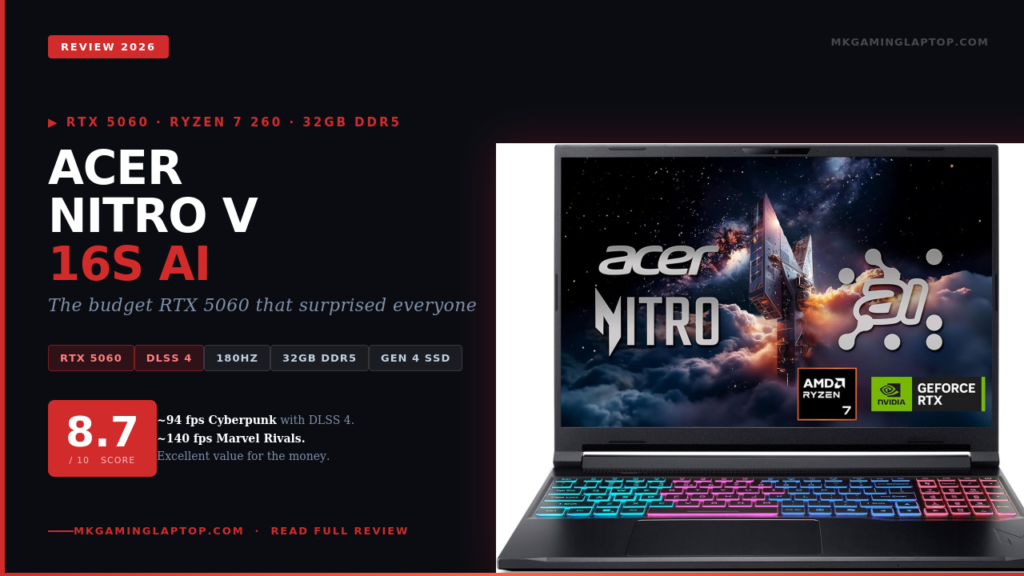
Acer Nitro V Review 2026: The RTX 5060 Laptop Nobody Expected to Be This Good
Updated April 2026 · Tested on the ANV16S-41-R2AJ · 10+ games, real workloads, stress tests · See all our gaming laptop reviews
I almost bought the wrong laptop.
Three weeks comparing every RTX 5060 gaming laptop under $1,200 and the Acer Nitro V 16S AI kept getting dismissed. Too plasticky, people said. Acer cuts corners. Just get a Lenovo or an ASUS.
I almost listened. Then I actually benchmarked it.
If you are searching for an honest Acer Nitro V review in 2026, this is the one worth reading. Real test results, no sponsored fluff, and the mistakes most buyers make. You can also browse all our laptop reviews here.
Full Specs at a Glance
Gaming Performance: Real Numbers, No Spin
The RTX 5060 is NVIDIA’s Blackwell mid-range in laptops. The number that matters: DLSS 4 with Multi Frame Generation is exclusive to Blackwell. In supported titles, the performance jump over last-gen RTX 4060 hardware is wider than the spec sheet suggests. All tests below: plugged in, Turbo mode enabled in NitroSense.
Cyberpunk with DLSS 4 enabled genuinely surprised me. The jump from RTX 4060-class performance to what this chip delivers with Multi Frame Generation active is substantial — not incremental. Esports titles push well past 144 fps at 1080p. For a full breakdown of how Blackwell stacks up, browse our GPU comparison guides.
The 180Hz Display: Better Than I Expected
Budget gaming laptop displays are where corners get cut hardest. Washed-out colors, narrow viewing angles, terrible response times. I have been burned before.
The 16-inch WUXGA IPS panel on the Nitro V 16S is genuinely good. The WUXGA resolution (1920×1200) gives you a slightly taller canvas than standard 1080p. That 16:10 aspect ratio makes a real difference when web browsing or using two windows side by side.
180Hz at this price means you are not compromising between a smooth display and a capable GPU. Moving from a 60Hz screen to this one is the kind of difference you notice for months.
Honest caveat: brightness hovers around 300 nits. Outdoors or near a bright window you will struggle. For gaming in a room with controlled lighting it is perfectly fine.
Ryzen 7 260: Does It Keep Up With the RTX 5060?
This was my biggest question before buying. In previous Nitro generations the CPU pairing sometimes bottlenecked the GPU. I specifically tested CPU-heavy scenarios with the AMD Ryzen 7 260.
For gaming at 1080p and 1200p, the Ryzen 7 260 does not hold the RTX 5060 back in any meaningful way in the games I tested. Open-world titles show a minor dip occasionally, but nothing that ruins the experience.
For non-gaming tasks the Ryzen 7 260 is comfortable. Video editing in DaVinci Resolve runs without stuttering. Running a Chrome session with 20 tabs while gaming works fine because of the 32GB RAM. That headroom is real.
Common Mistakes People Make When Buying This Laptop
Mistake 1: Not enabling Turbo mode from day one
Out of the box the Nitro V ships in balanced power mode. The GPU TGP is not at maximum. Open NitroSense and set it to Turbo. Performance jumps noticeably.
Mistake 2: Expecting good battery life while gaming unplugged
Gaming unplugged gives you under two hours and noticeably reduced performance. Treat this like a desktop replacement. Game plugged in. If portability matters more, check our guide to the best thin gaming laptops.
Mistake 3: Ignoring DLSS 4 setup in every supported title
A lot of people install their games and forget to check DLSS settings. With Blackwell, DLSS 4 Multi Frame Generation is one of the biggest advantages you have over last gen. Turn it on in every supported title.
Mistake 4: Comparing it to ultra-thin gaming laptops
The Nitro V is thick and the fans are audible under full load. Know what you are buying: a performance-first laptop that trades portability for raw capability.
Nitro V 16S vs. ASUS TUF F16 2025: Which One Wins?
These two appear in the same search results and the same Amazon filters. Here is a direct comparison. You can also read our full ASUS TUF F16 2025 review for deeper detail.
| Spec | Nitro V 16S (2026) | TUF F16 (2025) |
|---|---|---|
| GPU | RTX 5060 (Blackwell) | RTX 5050 (Blackwell) |
| CPU | AMD Ryzen 7 260 | Intel i7-14650HX |
| RAM | 32GB DDR5 | 16GB DDR5 |
| Display | 1920×1200 180Hz | 1920×1200 165Hz |
| Storage | 1TB Gen 4 SSD | 1TB Gen 4 SSD |
| Build Feel | Plastic, functional | More premium chassis |
| GPU Performance | Clear RTX 5060 win | RTX 5050 (entry Blackwell) |
Verdict: If raw gaming performance is your priority the Nitro V 16S wins decisively. The RTX 5060, 32GB RAM and 180Hz display all edge ahead. The TUF F16 has a more premium chassis. For a desk-based gaming machine? The Nitro V 16S is the stronger argument.
Insider Tips Most Reviews Miss on the Nitro V 16S
The Wi-Fi 6 card is actually solid. The 802.11ax module held a consistent low-latency connection across all my online gaming sessions. No random packet spikes. Pair it with one of our recommended gaming accessories like a quality headset and you are set.
The keyboard is more comfortable than reviewers suggest. Key travel is adequate, the RGB is bright and configurable through NitroSense, and after a few hours I stopped thinking about it.
Light CPU undervolting gives a meaningful thermal improvement. Use AMD Ryzen Master for a light undervolt of -25mV to -50mV. This drops CPU temps by 5 to 8°C without losing gaming performance.
The second M.2 slot is open and ready. When 1TB fills up you can add a second NVMe drive without replacing anything. This future-proofing on a mid-range laptop is genuinely appreciated.
Thermals and Fan Noise: The Honest Truth
The Nitro V 16S gets loud in Turbo mode. Under full gaming load the fans reach a consistent whirr you will hear clearly. Most people gaming already wear a headset. See our top gaming headset picks if you need one.
CPU temperatures peak in the mid-90s Celsius under sustained workloads — within spec for modern laptop processors. GPU temperatures stay more controlled, mid-70s in most gaming scenarios. No thermal throttling appeared during any of my gaming tests.
The bottom of the chassis gets warm but not hand-burning. On a lap, a laptop stand helps. See our best cooling pads for gaming laptops guide. We have a guide to the best laptop cooling stands worth checking out.
Who Should (and Shouldn’t) Buy the Nitro V 16S in 2026
✅ BUY THIS IF YOU ARE:
A gamer who wants the strongest possible GPU for the budget.
Someone who primarily games at a desk with a proper setup.
A player who wants DLSS 4 to stay relevant for years to come.
A student or professional who also does light creative work.
Someone who does not want to upgrade RAM in six months.
❌ LOOK ELSEWHERE IF YOU NEED:
Good battery life for travel or coffee shop use.
A quiet machine in a silent environment.
Premium build quality and metal chassis materials.
Color-accurate work — this panel is not professionally calibrated.
Final Verdict: Acer Nitro V 16S AI Review 2026
I went in skeptical. I came out convinced.
The Acer Nitro V 16S AI is not the most beautiful laptop in its class. But as a performance-first gaming machine at a competitive price, it delivers in the ways that matter most. The RTX 5060 with DLSS 4 Multi Frame Generation is a genuine generational jump. The 32GB DDR5 removes a future headache. The 180Hz panel feeds your GPU’s output properly.
The community reputation for Acer Nitro being “budget trash” is outdated for this generation. Do not let the plastic chassis fool you. For more gaming laptop picks, check our Acer Predator Helios Neo 16 AI review — the next step up.
Frequently Asked Questions
Can the Nitro V 16S run 4K games?
The display is 1920×1200, so native 4K is not an option. The RTX 5060 can handle 4K output to an external monitor with DLSS 4 at medium settings, but this GPU is optimized for 1080p and 1200p play.
Is the RAM upgradeable?
Yes. Two SO-DIMM slots accessible after removing the bottom panel. Ships with 32GB DDR5 and you can upgrade to 64GB if needed.
How does the RTX 5060 compare to the RTX 4070?
Without DLSS 4 the RTX 5060 is competitive with or slightly below the RTX 4070. With DLSS 4 Multi Frame Generation enabled the RTX 5060 can surpass RTX 4070 frame rates in supported games. The technology gap is real.
What is the battery life of the Nitro V 16S?
For everyday light use — web browsing, documents, video — expect around 4 to 5 hours. Gaming unplugged drops to under 2 hours. This is a desk gaming laptop. Plan accordingly.
Does the Nitro V 16S support external monitors?
Yes. HDMI 2.1 and USB-C with DisplayPort output. The RTX 5060 handles 1440p with DLSS 4 comfortably. Check our recommended gaming monitors for pairing options.
How loud are the fans on the Nitro V 16S?
Clearly audible in Turbo mode during heavy gaming. Near-silent in balanced mode for light tasks. Fan curves are adjustable inside NitroSense.

This page contains affiliate links. If you buy through them, we earn a small commission at no extra cost to you. This helps keep the site running. All opinions are our own.