
I spent close to $4,000 over two years buying laptops I thought would crush Fortnite.
The first one throttled after 20 minutes of ranked play. The second had a screen so washed out I could barely spot enemies in Tilted. The third was perfect — but I only figured out why after I nearly sent it back.
If you want to avoid that cycle, this guide is for you.
I am going to walk you through exactly what matters in a gaming laptop for Fortnite in 2026, which machines are actually worth it, what specs you can ignore, and the mistakes I see people making every single day in forums and comment sections.
The right setup does not need to be expensive. It just needs to be the right one.
Why Fortnite Is Actually Hard to Run Well (Most People Get This Wrong)
Here is something that surprised me when I first started digging into this.
Fortnite is not a graphically demanding game in the way something like Cyberpunk 2077 is. The art style is cartoony on purpose. But what it is demanding is frame rate consistency at high refresh rates.
Competitive Fortnite players are chasing 240fps or higher. Not because they can see every single frame, but because higher frame rates reduce input lag. That tiny delay between clicking your mouse and your character actually building or shooting — that is what kills you in a box fight.
So the laptop you need for Fortnite in 2026 is not about raw graphical power. It is about consistent, sustained high frame rates with a display that can actually show them.
That changes everything about how you should be shopping.
What Specs Actually Matter for Fortnite in 2026
The GPU: More Nuanced Than You Think
Most guides tell you to just “get an RTX 4070 or higher.” That is not wrong, but it is incomplete.
The GPU matters — but only up to a point. After a certain threshold, your CPU becomes the bottleneck in Fortnite because of how Unreal Engine handles game logic and physics calculations. I learned this the hard way when I upgraded the GPU in my setup and saw almost zero fps improvement.
For Fortnite in 2026, you want at minimum an NVIDIA RTX 4060 laptop GPU. At medium settings you will comfortably hit 240fps on most scenes. At the lowest competitive settings — which most serious players use — an RTX 4060 gets you there reliably.
The RTX 4070 laptop GPU is the sweet spot. It gives you headroom for higher resolution settings without ever sweating about frame drops.
The RTX 4080 and 4090 are genuinely overkill for Fortnite specifically. If you play other games too, or stream at the same time, they make more sense. But if Fortnite is your main game, you are paying a significant premium for almost nothing in gameplay terms.
One thing almost nobody talks about: Total Graphics Power (TGP). Laptop GPUs with the same model name can have wildly different performance depending on how much power the manufacturer allows them to draw. An RTX 4070 at 80W is meaningfully slower than one at 140W. Always check the TGP before buying. Manufacturers bury this in spec sheets, but sites like NotebookCheck list it clearly — I use it every single time before pulling the trigger on a new machine.
If you want a deeper breakdown of how GPU power limits affect Fortnite fps in real benchmarks, I covered it in detail in our GPU TGP Guide for Gaming Laptops.
The CPU: This Is Where Fortnite Actually Lives
Fortnite is one of the most CPU-dependent competitive games out there.
In 2026, the clear picks are the AMD Ryzen 9 7945HX, the Intel Core i9-14900HX, and the newer Intel Core Ultra 9 185H. All of these will max out what Fortnite can throw at them.
If you are on a tighter budget, the Ryzen 7 7745HX or Intel Core i7-14700HX are solid. You will not notice the difference in Fortnite alone.
What you want to avoid is anything with fewer than 8 performance cores. Older 6-core options from a few years ago start showing cracks in chapter 6 map areas with lots of build structures loaded simultaneously.

RAM: 16GB Is Fine, 32GB Is Better
Fortnite itself runs comfortably on 16GB. But if you have anything else open — Discord, a browser, OBS for streaming — 16GB starts showing its limits with stutters and memory compression hitches.
I run 32GB DDR5 now and I genuinely cannot remember the last time I had a hitch caused by memory. For about $40 to $60 more at purchase, it is worth it.
Make sure the RAM is running in dual channel. Some cheaper laptops run a single stick of RAM that looks identical on the spec sheet but performs noticeably worse. Ask the retailer or check reviews specifically mentioning dual channel configuration.
The Display: Where People Waste the Most Money
This is the area where people make the biggest mistake.
They buy a laptop with a stunning 4K OLED display — and then it becomes completely useless for competitive Fortnite. Why? Because 4K at 60Hz or even 120Hz is actively worse for competitive play than 1080p at 360Hz.
You want a 1080p or 1440p panel at 240Hz minimum for serious Fortnite play. In 2026, 360Hz panels are available at reasonable prices and are worth the upgrade.
IPS panels are currently the best balance of color accuracy, response time, and refresh rate. OLED laptops look incredible, but the burn-in risk over years of gaming on a static HUD makes me nervous for a daily driver machine.
Storage: NVMe SSD, Always
Fortnite in 2026 is a large install and updates frequently. You need an NVMe SSD.
Do not accept a SATA SSD or, worse, an HDD in a gaming laptop at any price point. The load times difference is night and day. Map loading in Battle Royale and lobby load times are noticeably faster on NVMe.
1TB is the minimum. Fortnite itself plus a few other games fills that faster than you expect.
The Best Gaming Laptops for Fortnite in 2026
Budget Pick: ASUS TUF Gaming A16 (Around $1,000 to $1,200)

I recommended this to my younger brother last Christmas and he has been grinding ranked ever since.
The TUF A16 with an RTX 4060 and Ryzen 7 7745HX hits consistent 200 to 240fps on low settings in Fortnite. The build quality is solid without being flashy. The thermals surprised me — ASUS has improved the heat pipe design significantly and it holds steady under long sessions.
The display in the upgraded configuration is a 165Hz IPS panel at 1080p. Honest answer: it is fine for Fortnite. If you are not yet at a rank where the difference between 165Hz and 240Hz will change your results, this is the one to get.
What I do not love: the speaker quality is not great, and the webcam is basic. For pure gaming, neither of those matters.
Mid-Range Pick: Lenovo Legion 5i Pro (Around $1,400 to $1,799)
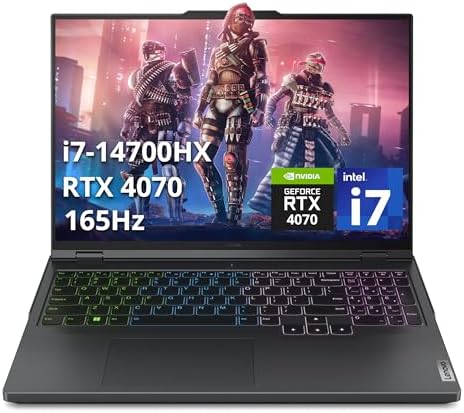
This is the laptop I wish I had bought the first time.
The Legion 5i Pro with an RTX 4070 and Intel Core i7-14700HX is a genuinely balanced machine. The 2560×1600 165Hz display (some configurations go to 240Hz) looks excellent. The keyboard has good travel for a laptop. Thermals are managed well thanks to a proper vapor chamber cooling system.
Fortnite performance at low competitive settings consistently hits 260 to 300fps in most scenes. During heavy build fights with lots of structures, I saw it dip to around 220fps — still well above where input lag becomes a factor.
The build feels premium without the premium price tag. The port selection is one of the best in its class. There is even a separate charging port and a USB-C with Thunderbolt support.
One small complaint: the included power brick is large. Not a dealbreaker but worth knowing if you travel with it.
High-End Pick: ASUS ROG Zephyrus G16 (Around $2,200 to $2,600)

This is the machine I am on right now and I have zero regrets.
The G16 with an RTX 4090 and Core Ultra 9 is overkill for Fortnite — I said it above and I will say it again. But it is an exceptional all-around machine. If you play other graphically demanding games, stream, or do video editing alongside Fortnite, this justifies the price.
The OLED display in some configurations is the most beautiful panel I have ever used on a laptop. However, for competitive play I switched to the 240Hz QHD IPS version. The OLED gets used when I am watching Netflix or playing single-player games. For ranked Fortnite, I want that high refresh rate IPS.
Thermals are excellent. Battery life is better than most gaming laptops in this class — around 6 hours of light use, though obviously gaming drains it fast.
The One to Avoid Right Now: Anything With a 12th Gen Intel U-Series Chip
I keep seeing these at major retailers positioned as “gaming laptops” because they have a dedicated GPU added on. Do not be fooled.
Ultra-low-voltage U-series chips are designed for thin and light productivity laptops. They have a TDP of 15 to 28W. When you pair one with an RTX 4060 and run Fortnite, the CPU cannot keep up. You will see frame drops, stuttering, and the GPU sitting idle waiting for the CPU to catch up.
The HX and H-series chips are what you want. The letter after the model number tells you a lot. HX is the performance king, H is the standard performance tier, U is low-power thin and light. For gaming, U is almost always wrong.
Mistakes People Make When Buying a Gaming Laptop for Fortnite
Buying on GPU spec alone. I covered this above but it bears repeating. The GPU is not the whole picture. An RTX 4090 with a weak CPU will get beaten in frame rate by an RTX 4070 with a strong CPU, specifically in Fortnite.
Ignoring the cooling system. A laptop can have incredible specs on paper and still throttle badly under sustained gaming load. Look for reviews that specifically test sustained performance over 30 to 60 minutes. Some budget laptops hit great numbers in 5-minute benchmarks and then lose 20 to 30% of performance once they heat up.
Not checking the refresh rate of the included panel. Manufacturers sell the same laptop chassis with different panel options. The base model might be 144Hz and the upgraded model 240Hz. Sometimes the upgrade is only $100 to $150 more. That is almost always worth it for Fortnite.
Buying a gaming laptop without reading the thermal throttling behavior. Some laptops, especially slimmer ones marketed as gaming-capable, hit a thermal ceiling quickly. The GPU and CPU reduce their speeds to avoid overheating. Your fps tanks right when you need it most — in a big lobby with lots happening on screen.
Skipping a quality mouse. This one has nothing to do with the laptop itself but I would feel bad not mentioning it. No laptop touchpad in existence is good for Fortnite at a competitive level. Budget $30 to $60 for a lightweight wired mouse alongside your laptop purchase. The difference in aim and editing speed is enormous. I put together a full list of the best gaming mice for Fortnite 2026 if you want a shortcut on that decision.

Real Costs and Realistic Expectations for 2026
Here is the honest breakdown of what you should expect to spend to play Fortnite well on a laptop:
Entry level ($900 to $1,200): RTX 4060, Ryzen 7 or Core i7 H-series, 16GB RAM, 512GB to 1TB NVMe, 144Hz to 165Hz display. You will hit 144 to 200fps at low settings. Great for casual ranked play.
Mid range ($1,300 to $1,800): RTX 4070, Core i7 or Ryzen 9 HX, 16 to 32GB RAM, 1TB NVMe, 240Hz display. This is the sweet spot. Consistent 240fps at competitive settings. Where I would tell most serious players to aim.
High end ($2,000 to $3,000): RTX 4080 or 4090, Core i9 or Ryzen 9 HX, 32GB RAM, 2TB NVMe, 240Hz to 360Hz display. Future-proofed for three to five years. Makes sense if Fortnite is your main game and you play at a high level, or if you also use the machine for content creation.
Add $30 to $80 for a gaming mouse. Add $60 to $150 for a decent headset if you do not already own one. A mouse pad with a hard surface is around $20 and genuinely helps aim consistency on a desk.
Advanced Tips Most Articles Do Not Tell You
Use Performance Mode in Windows. Go to Settings, then Power, then set your power mode to Best Performance when plugged in. Some laptops have their own software to override this further. Every frame counts and leaving this on Balanced mode is leaving fps on the table.
Set Fortnite to DirectX 12 or Nanite Virtualized Geometry. In 2025 and 2026 builds of Fortnite, DirectX 12 combined with the Nanite rendering option can actually improve performance on newer GPUs compared to DX11. Test both and benchmark the difference on your specific machine. Epic Games outlines the minimum and recommended system requirements for Fortnite if you want to verify your laptop meets the baseline before adjusting any settings.
For a step-by-step walkthrough of every in-game setting and what it actually does to your fps, check out our Fortnite PC Settings Guide for Max FPS.
Disable vsync and set a frame rate cap instead. V-sync adds input lag. But uncapped frame rates can cause screen tearing and make your GPU run hotter than necessary. I set a frame rate cap at 10fps above my monitor’s refresh rate. So on a 240Hz panel I cap at 250fps. This keeps temps reasonable while keeping input lag low.
Undervolt if your laptop allows it. This one is more advanced but very worth doing. Tools like ThrottleStop (Intel) or AMD’s built-in options let you reduce the voltage your CPU runs at. Same performance, lower heat, more sustained clock speeds, longer battery life. Tom’s Hardware has a solid beginner guide to undervolting laptop CPUs that I actually followed myself the first time. Just go slowly and test stability.
Once your thermals are dialed in, the next step is making sure your whole setup is tuned — our Gaming Laptop Optimization Checklist covers everything from Windows settings to in-game config in one place.
Plug in to a wall socket for ranked play. Battery power mode almost always reduces CPU and GPU power limits. Even on a fully charged battery, the laptop is often drawing less power than when plugged in. For casual play this is fine. For ranked, plug in.
FAQ: Real Questions People Are Asking in 2026
Is 16GB RAM enough for Fortnite in 2026? Yes for just Fortnite. No if you also run Discord, a browser with multiple tabs, and OBS at the same time. If budget allows, 32GB saves headaches.
Does Fortnite run better on AMD or Intel? It genuinely depends on the specific model. Both Intel Core i9-14900HX and AMD Ryzen 9 7945HX perform excellently. Intel chips tend to have slightly higher single-core boost clocks which helps Fortnite specifically. AMD chips tend to run cooler. Either works great.
Is a gaming laptop worth it for Fortnite or should I build a desktop? A desktop at the same budget will always outperform a laptop for Fortnite. But if you need portability — to game at a friend’s house, travel, or study somewhere other than home — a laptop makes sense. If you will only ever play at a desk at home, a desktop is better value. We compared both options head to head in our Gaming Laptop vs Desktop for Fortnite: Which Is Actually Worth It article if you want the full breakdown before deciding.
Can I play Fortnite on a laptop without a dedicated GPU? Technically yes — Fortnite can run on integrated graphics. But you will be below 60fps at low settings. Competitive play is not realistic. You need a dedicated GPU for anything beyond casual matches.
Will a gaming laptop overheat playing Fortnite for hours? This depends entirely on the specific model and its cooling design. Good laptops manage heat well indefinitely. Poor ones throttle. Always look for sustained performance tests in reviews, not just peak benchmarks.
What refresh rate display do I actually need? For casual play, 144Hz is fine. For competitive ranked play, 240Hz is a meaningful upgrade. 360Hz is the ceiling where diminishing returns kick in hard.
The Bottom Line
If I had to point one person at one laptop right now for Fortnite in 2026, it would be the Lenovo Legion 5i Pro at the RTX 4070 configuration.
It hits the frame rates that matter. It has the display to show them. The thermals hold up over long sessions. And it does not cost so much that you feel sick if you spill something on it.
If budget is tight, the ASUS TUF A16 is genuinely good and I would not feel bad recommending it.
If money is not a concern and you want the best possible experience across all games plus content creation, the ASUS ROG Zephyrus G16 is exceptional.
The most important thing: do not get distracted by specs that do not move the needle in Fortnite. A calm, sustained 240fps on a 240Hz panel with low input lag settings beats a laptop with a flashier GPU that throttles to 180fps after 15 minutes of ranked play.
Buy once, buy smart, and spend more time playing than researching.